
Description
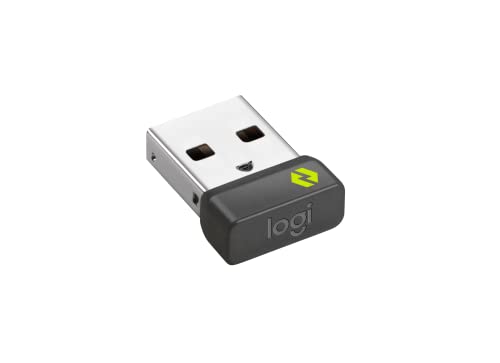
LOGITECH Bolt USB Receiver – Features & Prices in Saudi Arabia :
LOGITECH Bolt USB Receiver
Brand
Logitech
Item model number
956-000007
Item Weight
0.352 ounces
Product Dimensions
0.36 x 0.65 x 1.08 inches
Item Dimensions LxWxH
0.36 x 0.65 x 1.08 inches
Color
Black
Manufacturer
Logitech
ASIN
B09JL9Y1WS
Country of Origin
China
Date First Available
October 15, 2021
Test video – LOGITECH Bolt USB Receiver :
Product highlights :
Questions & Answers – LOGITECH Bolt USB Receiver :
Technical specifications – LOGITECH Bolt USB Receiver :
Purchase advice :
-
Warranty :
Check the duration of the warranty and also the faults and defects it covers. Is it complete or limited? and What is included in the warranty (parts, repairs or both)?
-
Shipping :
Is delivery offered? And how long does it take to get delivered (Delivery time)
-
Proof of purchase :
Does the shop give you an invoice ?
-
After-sales service :
Do they have an after-sales service to have information about the installation or operation (instructions for use). Also in case of problem, it is the seller who takes charge or you must contact the manufacturer or supplier yourself.
_____________________________


G. K (verified owner) –
Not happy – Really not happy with this receiver thought I could connect my anywhere 3 mouse to it but it will not pair up to it whatsoever I’ve tried over and over and it connected right away with my keyboard but not my mouse that’s another USB port I’ll have to use I thought I could free up some USB ports by using one dongle but I guess not
M. Z (verified owner) –
Need For MX Keys Mini – Needed this instead of Bluetooth connection on MX KEYS MINI keyboard. If you need to adjust settings in BIOS the Bluetooth connection will not be active until after the destop system is completely up and running. This gadget solved the problem. The USB ports are active right after POST, so it recognizes the keyboard when you hit F2 or F8. Giving 4 stars since the price is high for such a tiny piece of hardware.
F. A (verified owner) –
Lag-free alternative to Bluetooth – I recently picked up a Logitech MX Keys Mini but was disappointed by how often I ran into reconnection lag that’s common with bluetooth keyboards; after ~ten seconds of not pressing any keys, there’s a delay before new inputs are processed (and often they get buffered, sending a bunch all at once).
K. K (verified owner) –
Should have come with a keyboard – I do like Logitech’s new Bolt system, connects right away and you don’t have to go through the silly pairing process. They do lose one star for not including it with a keyboard.
K. T (verified owner) –
MX Keys Mini wouldn’t work without it… – So I bought the MX Keys Mini Bluetooth keyboard for my daughter. Interestingly enough, it’s apparently a known issue that the Bluetooth connectivity is terrible on these keyboards. So why have Bluetooth on it at all?!?!? As a last ditch after exhaustive troubleshooting I bought the bolt receiver. It works now. The Bluetooth keyboard that doesn’t work with Bluetooth works as long as you spend more money and take up a USB port. As a side note, a $20 no name Bluetooth keyboard worked fine. Go figure.
O. N (verified owner) –
Work as it should – I only deduct one star off cause it is not came with my logi MX keys mini. Otherwise, it performs as it should.
C. E (verified owner) –
Great little reciever! – I am currently running 3 of these receivers with my mac, pc, and xbox series x (YES they even work with an xbox!) with my MX keys mini keyboard.
K. T (verified owner) –
MX Keys Mini wouldn’t work without it… – So I bought the MX Keys Mini Bluetooth keyboard for my daughter. Interestingly enough, it’s apparently a known issue that the Bluetooth connectivity is terrible on these keyboards. So why have Bluetooth on it at all?!?!? As a last ditch after exhaustive troubleshooting I bought the bolt receiver. It works now. The Bluetooth keyboard that doesn’t work with Bluetooth works as long as you spend more money and take up a USB port. As a side note, a $20 no name Bluetooth keyboard worked fine. Go figure.
M. Z (verified owner) –
Need For MX Keys Mini – Needed this instead of Bluetooth connection on MX KEYS MINI keyboard. If you need to adjust settings in BIOS the Bluetooth connection will not be active until after the destop system is completely up and running. This gadget solved the problem. The USB ports are active right after POST, so it recognizes the keyboard when you hit F2 or F8. Giving 4 stars since the price is high for such a tiny piece of hardware.
G. K (verified owner) –
Not happy – Really not happy with this receiver thought I could connect my anywhere 3 mouse to it but it will not pair up to it whatsoever I’ve tried over and over and it connected right away with my keyboard but not my mouse that’s another USB port I’ll have to use I thought I could free up some USB ports by using one dongle but I guess not
C. E (verified owner) –
Great little reciever! – I am currently running 3 of these receivers with my mac, pc, and xbox series x (YES they even work with an xbox!) with my MX keys mini keyboard.
K. N (verified owner) –
Good but should be included with MX Keys Mini keyboard – And the MX Anywhere mouse still doesn’t support the Bolt receiver except the “business” model which is not available to consumers. What gives?
O. N (verified owner) –
Work as it should – I only deduct one star off cause it is not came with my logi MX keys mini. Otherwise, it performs as it should.
K. K (verified owner) –
Should have come with a keyboard – I do like Logitech’s new Bolt system, connects right away and you don’t have to go through the silly pairing process. They do lose one star for not including it with a keyboard.
K. N (verified owner) –
Good but should be included with MX Keys Mini keyboard – And the MX Anywhere mouse still doesn’t support the Bolt receiver except the “business” model which is not available to consumers. What gives?
F. A (verified owner) –
Lag-free alternative to Bluetooth – I recently picked up a Logitech MX Keys Mini but was disappointed by how often I ran into reconnection lag that’s common with bluetooth keyboards; after ~ten seconds of not pressing any keys, there’s a delay before new inputs are processed (and often they get buffered, sending a bunch all at once).