Description
SAMSUNG M8 Series 32-Inch 4K UHD Smart – Features & Prices in Saudi Arabia :
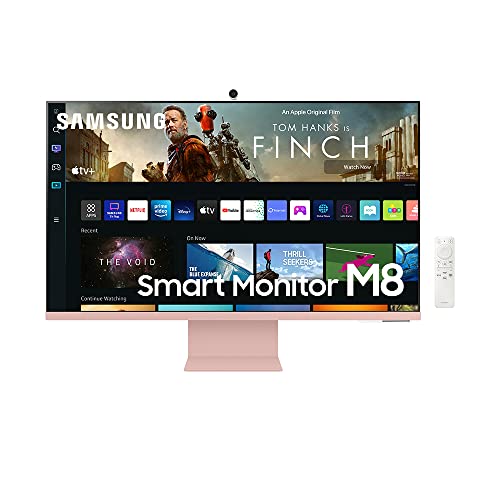
SAMSUNG M8 Series 32-Inch 4K UHD Smart Monitor & Streaming TV with Slim-fit Webcam for PC-Less Experience, Netflix, HBO, Prime VOD, & More, Apple Airplay, WiFi, BT, Built-in Speakers, 2022, Pink
Standing screen display size
Test video – SAMSUNG M8 Series 32-Inch 4K UHD Smart :
Product highlights :
SMART TV EXPERIENCE: Enjoy Netflix, YouTube and other streaming services by simply connecting the monitor to WiFi; Samsung TV Plus also offers free, live, on-demand content with no downloads or sign-up needed, while Universal Guide provides personalized content recommendations*.
FLAVORFUL COLOR OPTIONS: Smart Monitor provides a pop of your favorite color to instantly lighten any room design; Choose from white, pink, blue or green and make your space authentically you**
ICONIC SLIM DESIGN: The Smart Monitor is built with your lifestyle in mind, delivering a more cutting-edge design; With an ultra-slim flat back, neat camera design and beautiful colors, the monitor offers a minimalist look that enhances your setup with super style***
PC-LESS PRODUCTIVITY: Browse the web, edit documents and work on projects, all without the need for a separate PC; With new Workmode, you can also remotely access another PC, use Microsoft 365 programs and connect to Samsung mobile devices with Samsung DeX for seamless working****
SLIMFIT CAMERA: The SlimFit camera with tilt functionality allows you to create the perfect angle while using your favorite video call apps like Google Duo, which can be accessed directly through the monitor; Camera cover and option to fully detach always protect your privacy
Questions & Answers – SAMSUNG M8 Series 32-Inch 4K UHD Smart :
➕ What is the price of SAMSUNG M8 Series 32-Inch 4K UHD Smart in Saudi Arabia ?
The price of SAMSUNG M8 Series 32-Inch 4K UHD Smart in-store is 2230 SAR VAT.
➕ When SAMSUNG M8 Series 32-Inch 4K UHD Smart was released ?
The release date was November 1, 2022.
➕ What is the price of SAMSUNG M8 Series 32-Inch 4K UHD Smart cheap used ?
The price of SAMSUNG M8 Series 32-Inch 4K UHD Smart used is 1560 SAR VAT.
➕ What are the main characteristics of SAMSUNG M8 Series 32-Inch 4K UHD Smart ?
Special specifications :
SMART TV EXPERIENCE: Enjoy Netflix, YouTube and other streaming services by simply connecting the monitor to WiFi; Samsung TV Plus also offers free, live, on-demand content with no downloads or sign-up needed, while Universal Guide provides personalized content recommendations*.
➕ Is it interesting to buy this product ?
The best people who can answer you are customers who have already bought and tested
this product (
See Customer Reviews). This product is rated 4 / 5
on Amazon.
➕ Where to buy SAMSUNG M8 Series 32-Inch 4K UHD Smart in Saudi Arabia ?
Mall, Supermarkets, Amazon, Specialized stores, ….
Technical specifications – SAMSUNG M8 Series 32-Inch 4K UHD Smart :
Display Resolution Maximum
Built-In Webcam, Height Adjustment, USB Hub, High Dynamic Range, Built-In Speakers
Purchase advice :
-
Warranty :
Check the duration of the warranty and also the faults and defects it covers. Is it complete or limited? and What is included in the warranty (parts, repairs or both)?
-
Shipping :
Is delivery offered? And how long does it take to get delivered (Delivery time)
-
Proof of purchase :
Does the shop give you an invoice ?
-
After-sales service :
Do they have an after-sales service to have information about the installation or operation (instructions for use). Also in case of problem, it is the seller who takes charge or you must contact the manufacturer or supplier yourself.
_____________________________


D. L (verified owner) –
Love the big screen – I think this product is beautiful, the quality of the monitor is amazing. However, there is a color variance, so you will have to change that depending on what kind of computer you use. I pair it with my Mac and it works well. I seen in the video attaching it to the base is kind of hard especially when it doesn’t click all the way to stay flat. You have to click it in to get a little tilt, but I find that when I raise it and get the tilt, it looks good just a little nervous about it falling off but it hasn’t yet so fingers crossed. The camera is good I like that the little camera cover is magnetic so it can just be attached to the back of the camera and you don’t lose it The quality of the camera is OK. I’ll use my logitech instead , I also use it as a TV and watch YouTube Netflix and HBO on this and it’s pretty good with those. I would say as a desk monitor this is probably better than getting it as a regular TV, but if you’re sitting at your desk and wanna watch TV, this is pretty good. The packaging it came in was pretty solid, and to put it together took a while because attaching the monitor to the base was a little hard but other than that I’ve had a lot of fun using it and it’s a great addition to my set up.
K. E (verified owner) –
I love this monitor. It is so worth the price. – I used to have a 32″ gaming monitor that I used specifically for my PC for gaming. However, I headed the big clunky stand and I wanted it to easily connect to my Macbook for school. I saw this monitor and was a little hesitant because of the price. I have had this monitor for about 2 weeks and I am already in love. It is super easy to set up. I love the pink color. It is so much better than an iMac because of the bigger screen size and light weight. I can easily connect to my PC for gaming without having to disconnect my Macbook. The slim camera has great quality in taking in the picture when I have my MacBook closed. The smart TV option is super easy to navigate. The speakers have a good range and clarity.
K. K (verified owner) –
It’s a “cool” monitor but lacks function – This monitor is beautiful. I liked the look of it and the idea that it had tv built in and I could do PIP mode while I work. However, two things that make this monitor worthless and the reasons I am returning it are poor picture quality and colors. I do graphic design and cannot get the colors right, it’s also very pixelated and just isn’t going to cut it. I’ve searched the internet for ways to make it better and messed around with the settings but my internet search just resulted in learning about others similar experience. The other reason is that I can’t add other apps to the multi view mode, the only options I have are you tube or screen mirroring my iPad or phone, which sort of makes it not as smart in my opinion. I use Hulu for my tv service and I’d rather just be able to add the Hulu app to the setting but I can’t figure it out and others have made the same complaint. If it were a $300-400 monitor, I’d expect some of this, but I’d rather spend the extra $600 on an Apple monitor and sleep better at night about knowing I’m getting the best quality.
K. L (verified owner) –
Pretty, but there are better options. – It looks really nice. The remote is well designed. Nice webcam. The colors are decently accurate for the price. Not the best viewing angles which is odd for such a large size monitor. The smart TV functions are great. However the port selection is poor and the mount is proprietary. There are better solutions available if you don’t need the aesthetic.
N. T (verified owner) –
Massive screen equipped with really nice display – Definitely a screen for entertainment and office work combined. The screen I mainly use before this monitor arrived was my Asus TUF laptop’s monitor and the colors look better on the M8. I tried playing games on it and it’s not too bad even if it’s just 60hz. Just don’t expect much as this isn’t gaming monitor.
K. K (verified owner) –
I love it but… – I love this monitor but it is not for anyone who is tech illiterate. It is a breeze to set up with anything with Bluetooth or wireless. Anything that you want to hard wire, cable or desktop computer, you need a degree. If you have more than one thing to connect with a cable you’ll need a docking station. This monitor is sadly lacking in ports. Otherwise it’s wonderful.
K. L (verified owner) –
Pretty, but there are better options. – It looks really nice. The remote is well designed. Nice webcam. The colors are decently accurate for the price. Not the best viewing angles which is odd for such a large size monitor. The smart TV functions are great. However the port selection is poor and the mount is proprietary. There are better solutions available if you don’t need the aesthetic.
D. L (verified owner) –
Love the big screen – I think this product is beautiful, the quality of the monitor is amazing. However, there is a color variance, so you will have to change that depending on what kind of computer you use. I pair it with my Mac and it works well. I seen in the video attaching it to the base is kind of hard especially when it doesn’t click all the way to stay flat. You have to click it in to get a little tilt, but I find that when I raise it and get the tilt, it looks good just a little nervous about it falling off but it hasn’t yet so fingers crossed. The camera is good I like that the little camera cover is magnetic so it can just be attached to the back of the camera and you don’t lose it The quality of the camera is OK. I’ll use my logitech instead , I also use it as a TV and watch YouTube Netflix and HBO on this and it’s pretty good with those. I would say as a desk monitor this is probably better than getting it as a regular TV, but if you’re sitting at your desk and wanna watch TV, this is pretty good. The packaging it came in was pretty solid, and to put it together took a while because attaching the monitor to the base was a little hard but other than that I’ve had a lot of fun using it and it’s a great addition to my set up.
N. T (verified owner) –
Great but not the best for MacBook Users – Unless you REALLY know what you’re doing, getting your MacBook to connect seamlessly to the M8 isn’t going to happen. After a couple of days of messing with the set-up and realizing my 2018 MacBook Pro wasn’t going to recognize the USB C cable, I switched to the mini HDMI, purchased a j5create Power Delivery converter, and the screen is up and running. The built-in camera DOES NOT WORK when your Mac is plugged into the HDMI. Any visions of running my Teams meetings on the M8 were shattered. If there is a way, it’s been two weeks and dozens of YouTube videos, and I still can’t figure it out. If this worked as I needed it to, it would be glorious – now it’s just a fancy big screen.
K. E (verified owner) –
I love this monitor. It is so worth the price. – I used to have a 32″ gaming monitor that I used specifically for my PC for gaming. However, I headed the big clunky stand and I wanted it to easily connect to my Macbook for school. I saw this monitor and was a little hesitant because of the price. I have had this monitor for about 2 weeks and I am already in love. It is super easy to set up. I love the pink color. It is so much better than an iMac because of the bigger screen size and light weight. I can easily connect to my PC for gaming without having to disconnect my Macbook. The slim camera has great quality in taking in the picture when I have my MacBook closed. The smart TV option is super easy to navigate. The speakers have a good range and clarity.
K. K (verified owner) –
I love it but… – I love this monitor but it is not for anyone who is tech illiterate. It is a breeze to set up with anything with Bluetooth or wireless. Anything that you want to hard wire, cable or desktop computer, you need a degree. If you have more than one thing to connect with a cable you’ll need a docking station. This monitor is sadly lacking in ports. Otherwise it’s wonderful.
N. T (verified owner) –
Massive screen equipped with really nice display – Definitely a screen for entertainment and office work combined. The screen I mainly use before this monitor arrived was my Asus TUF laptop’s monitor and the colors look better on the M8. I tried playing games on it and it’s not too bad even if it’s just 60hz. Just don’t expect much as this isn’t gaming monitor.
N. T (verified owner) –
Great but not the best for MacBook Users – Unless you REALLY know what you’re doing, getting your MacBook to connect seamlessly to the M8 isn’t going to happen. After a couple of days of messing with the set-up and realizing my 2018 MacBook Pro wasn’t going to recognize the USB C cable, I switched to the mini HDMI, purchased a j5create Power Delivery converter, and the screen is up and running. The built-in camera DOES NOT WORK when your Mac is plugged into the HDMI. Any visions of running my Teams meetings on the M8 were shattered. If there is a way, it’s been two weeks and dozens of YouTube videos, and I still can’t figure it out. If this worked as I needed it to, it would be glorious – now it’s just a fancy big screen.
K. K (verified owner) –
It’s a “cool” monitor but lacks function – This monitor is beautiful. I liked the look of it and the idea that it had tv built in and I could do PIP mode while I work. However, two things that make this monitor worthless and the reasons I am returning it are poor picture quality and colors. I do graphic design and cannot get the colors right, it’s also very pixelated and just isn’t going to cut it. I’ve searched the internet for ways to make it better and messed around with the settings but my internet search just resulted in learning about others similar experience. The other reason is that I can’t add other apps to the multi view mode, the only options I have are you tube or screen mirroring my iPad or phone, which sort of makes it not as smart in my opinion. I use Hulu for my tv service and I’d rather just be able to add the Hulu app to the setting but I can’t figure it out and others have made the same complaint. If it were a $300-400 monitor, I’d expect some of this, but I’d rather spend the extra $600 on an Apple monitor and sleep better at night about knowing I’m getting the best quality.