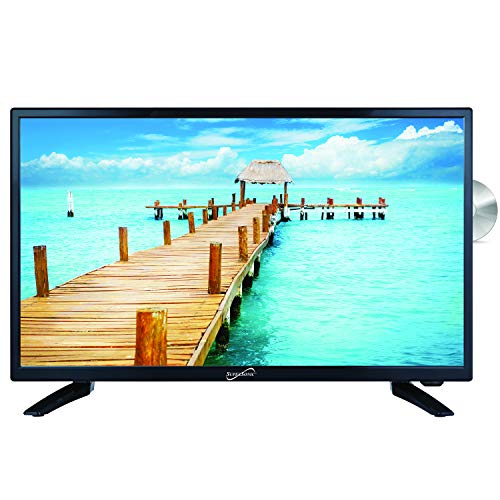
SuperSonic SC-2412 LED Widescreen HDTV & Monitor – Features & Prices in Saudi Arabia :
SuperSonic SC-2412 LED Widescreen HDTV & Monitor 24″, Built-in DVD Player with HDMI, USB, SD & AC/DC Input: DVD/CD/CDR High Resolution and Digital Noise Reduction
Product Dimensions
22.21 x 6.5 x 14.33 inches
Item Weight
7.92 pounds
ASIN
B007GFD3EW
Item model number
SC-2412
Batteries
2 AAA batteries required. (included)
Is Discontinued By Manufacturer
No
Date First Available
March 2, 2012
Department
LCD-Flat Screen
Manufacturer
SUPERSONIC INC.
Country of Origin
China
Test video – SuperSonic SC-2412 LED Widescreen HDTV & Monitor :
Product highlights :
HD DETAIL : Supersonic HDTV brings you a crisp 1080p picture quality for stunning detail and contrast. With a 1366*768 resolution, every detail can be seen. The colors projected from the monitor contains a spectrum of vibrant colors. This TV has digital noise reduction and multiple picture modes such as Standard, Dynamic, and more; This provides you with the best viewing experience!
BUILT-IN DVD PLAYER : Supersonic HDTV comes equipped with a DVD player built into the television set. This will allow you to play your DVDs without any other equipment. DVD formats compatible are DVD, CD, CDR, CDRW, DVD+/- R, DVD+/- RW, VCD, and SVCD.
Excellent Design : Supersonic HDTV is a stylish TV that will be a great addition to your living room. With its slim bezel design, It can fit in smaller places that other TV sets simply cannot! This TV will allow you to save floor space and place it almost anywhere you please.
Inputs and Outputs : Your TV contains HDMI, USB, and AC ports. This feature allows you to freely use your Firestick or similar hardware to browse thousands of channels and apps such as Netflix, Hulu, HBO, Showtime, and more. Input compatible terminals are HDMI, VGA, RF, USB, PC Audio, CVBS, and Audio L/R.
️ PC INPUT ️: This feature allows you to use your TV as a computer monitor. Simply connect a HDMI cable and select the right setting. This will make the TV a PC monitor! The screen size and resolution make for a great PC experience.
➕ What is the price of SuperSonic SC-2412 LED Widescreen HDTV & Monitor in Saudi Arabia ?
The price of SuperSonic SC-2412 LED Widescreen HDTV & Monitor in-store is 730 SAR VAT.
➕ When SuperSonic SC-2412 LED Widescreen HDTV & Monitor was released ?
The release date was March 2, 2012.
➕ What is the price of SuperSonic SC-2412 LED Widescreen HDTV & Monitor cheap used ?
The price of SuperSonic SC-2412 LED Widescreen HDTV & Monitor used is 510 SAR VAT.
➕ What are the main characteristics of SuperSonic SC-2412 LED Widescreen HDTV & Monitor ?
Special specifications :
HD DETAIL : Supersonic HDTV brings you a crisp 1080p picture quality for stunning detail and contrast. With a 1366*768 resolution, every detail can be seen. The colors projected from the monitor contains a spectrum of vibrant colors. This TV has digital noise reduction and multiple picture modes such as Standard, Dynamic, and more; This provides you with the best viewing experience!
➕ Is it interesting to buy this product ?
The best people who can answer you are customers who have already bought and tested this product (See Customer Reviews). This product is rated 4 / 5 on Amazon.
➕ Where to buy SuperSonic SC-2412 LED Widescreen HDTV & Monitor in Saudi Arabia ?
Check the duration of the warranty and also the faults and defects it covers. Is it complete or limited? and What is included in the warranty (parts, repairs or both)?
Shipping :
Is delivery offered? And how long does it take to get delivered (Delivery time)
Proof of purchase :
Does the shop give you an invoice ?
After-sales service :
Do they have an after-sales service to have information about the installation or operation (instructions for use). Also in case of problem, it is the seller who takes charge or you must contact the manufacturer or supplier yourself.
_____________________________
10 reviews for SuperSonic SC-2412 LED Widescreen HDTV & Monitor
Z. M (verified owner)–
– We purchased this TV for our RV. So far, the picture and sound quality are good. The viewing range is really good as we set it up in the middle of the room and the kids watch from their bunks on either side of it. The sound is plenty good enough for RV use. The DVD player works perfectly and we like that we can switch it to a 12V television if ever we need to. We are very happy with our purchase.
Rated 4 out of 5
M. L (verified owner)–
Nice 110, 12 volt combo – This is my second order on this TV — I could not get power to the USB/SD inputs. I returned TV and reordered same model — Thank you Amazon Prime. I read where only one other person had this problem, but it was different, they even had a different remote. So, I sent my first order back and replaced it with this second, same model TV. Again, this replacement seemed to have the same problem. What are the odds? So, I sat down and tried to figure this out — apparently, I am the only one who ever ordered one of these and was not able to understand how to get the USB/SD to work? I am tech savvy, or thought I was. Anyway, I went through the very detailed manual and nothing. Then, I stopped looking at this as a TV with built in DVD player and imagined it as a TV with a stand along DVD player with USB and SD slots. The TV itself, has a USB Source input choice on the menu — ignore this — there is another physical USB input on the back of the TV alongside the HDMI input. Turns out that in order to get the USB/SD inputs to work or power up, you have to be in the Source menu and select DVD — after selecting DVD then find the D.USB/SD button, on the bottom row of the remote — D.USB/SD and press that button while watching screen messages alerting you into which input you are entering. It will change from DVD to USB or SD. There, you have it, the USB and or the SD come alive and will read the USB or the SD inserted. Just cycle back by pressing the D.USB/SD button to get back to DVD. Somehow this procedure is left out of the Manual. It is only understood, in the manual procedures, if you understand this one concept, that it is the DVD that controls the USB/SD slots nest to the DVD slot. A second USB input is located on the back/bottom of the TV where you would plug in your Firestick or Roku, which I have done, and my Amazon Firestick works perfectly. I hope this helps someone else — I canceled my previous review — This is a corrected update, so, if you read my previous review, please ignore. This is the real solution solved.
F. I (verified owner)–
– It works. picture quality is good, sound is poor through built in speakers… I use it with a small amp anyway. fairly sturdy, dvd drive is quiet. The remote could easily be snapped in a hissy fit, but works well. Mounting options are all there… reasonable connectivity. Good for the camper.
Rated 5 out of 5
G. H (verified owner)–
Know what you are buying – I bought this to replace a 23 yr old conversion van CRT. After reading all the reviews, It seemed people liked this unit over a competing brand because the other unit had a clunky remote. This remote works very well IMO. SO good choice there. Speaker and sound level output is not great on ANY TV in this price/use case scenario. Know that going in. Rattling down the road in a 23 yr old vehicle that has 8 million screws added by conversion jockeys is an orchestra of clanks and bangs. Add wheelchairs, lifts and an engine at your feet and you get the idea. You need to ROCK OUT with sound.
Rated 5 out of 5
G. H (verified owner)–
Know what you are buying – I bought this to replace a 23 yr old conversion van CRT. After reading all the reviews, It seemed people liked this unit over a competing brand because the other unit had a clunky remote. This remote works very well IMO. SO good choice there. Speaker and sound level output is not great on ANY TV in this price/use case scenario. Know that going in. Rattling down the road in a 23 yr old vehicle that has 8 million screws added by conversion jockeys is an orchestra of clanks and bangs. Add wheelchairs, lifts and an engine at your feet and you get the idea. You need to ROCK OUT with sound.
Rated 4 out of 5
E. B (verified owner)–
VESA Mounting Screws not included – Haven’t turned on the tv yet, but this review is as a heads up: if you are going to use a VESA mount instead of the included leg stand, be aware that the included screws only fit the leg stand holes on the bottom of the TV and will not fit the proved VESA mount holes on the back of the TV. Come on. How hard would it have been to make all the mounting holes the same? Anyway, if you’re going to use a VESA mount, go ahead and order M4 12 mm screws (as specified in the manual) and washers.
Rated 4 out of 5
E. B (verified owner)–
VESA Mounting Screws not included – Haven’t turned on the tv yet, but this review is as a heads up: if you are going to use a VESA mount instead of the included leg stand, be aware that the included screws only fit the leg stand holes on the bottom of the TV and will not fit the proved VESA mount holes on the back of the TV. Come on. How hard would it have been to make all the mounting holes the same? Anyway, if you’re going to use a VESA mount, go ahead and order M4 12 mm screws (as specified in the manual) and washers.
Z. M (verified owner)–
– We purchased this TV for our RV. So far, the picture and sound quality are good. The viewing range is really good as we set it up in the middle of the room and the kids watch from their bunks on either side of it. The sound is plenty good enough for RV use. The DVD player works perfectly and we like that we can switch it to a 12V television if ever we need to. We are very happy with our purchase.
Rated 4 out of 5
M. L (verified owner)–
Nice 110, 12 volt combo – This is my second order on this TV — I could not get power to the USB/SD inputs. I returned TV and reordered same model — Thank you Amazon Prime. I read where only one other person had this problem, but it was different, they even had a different remote. So, I sent my first order back and replaced it with this second, same model TV. Again, this replacement seemed to have the same problem. What are the odds? So, I sat down and tried to figure this out — apparently, I am the only one who ever ordered one of these and was not able to understand how to get the USB/SD to work? I am tech savvy, or thought I was. Anyway, I went through the very detailed manual and nothing. Then, I stopped looking at this as a TV with built in DVD player and imagined it as a TV with a stand along DVD player with USB and SD slots. The TV itself, has a USB Source input choice on the menu — ignore this — there is another physical USB input on the back of the TV alongside the HDMI input. Turns out that in order to get the USB/SD inputs to work or power up, you have to be in the Source menu and select DVD — after selecting DVD then find the D.USB/SD button, on the bottom row of the remote — D.USB/SD and press that button while watching screen messages alerting you into which input you are entering. It will change from DVD to USB or SD. There, you have it, the USB and or the SD come alive and will read the USB or the SD inserted. Just cycle back by pressing the D.USB/SD button to get back to DVD. Somehow this procedure is left out of the Manual. It is only understood, in the manual procedures, if you understand this one concept, that it is the DVD that controls the USB/SD slots nest to the DVD slot. A second USB input is located on the back/bottom of the TV where you would plug in your Firestick or Roku, which I have done, and my Amazon Firestick works perfectly. I hope this helps someone else — I canceled my previous review — This is a corrected update, so, if you read my previous review, please ignore. This is the real solution solved.
F. I (verified owner)–
– It works. picture quality is good, sound is poor through built in speakers… I use it with a small amp anyway. fairly sturdy, dvd drive is quiet. The remote could easily be snapped in a hissy fit, but works well. Mounting options are all there… reasonable connectivity. Good for the camper.

Z. M (verified owner) –
– We purchased this TV for our RV. So far, the picture and sound quality are good. The viewing range is really good as we set it up in the middle of the room and the kids watch from their bunks on either side of it. The sound is plenty good enough for RV use. The DVD player works perfectly and we like that we can switch it to a 12V television if ever we need to. We are very happy with our purchase.
M. L (verified owner) –
Nice 110, 12 volt combo – This is my second order on this TV — I could not get power to the USB/SD inputs. I returned TV and reordered same model — Thank you Amazon Prime. I read where only one other person had this problem, but it was different, they even had a different remote. So, I sent my first order back and replaced it with this second, same model TV. Again, this replacement seemed to have the same problem. What are the odds? So, I sat down and tried to figure this out — apparently, I am the only one who ever ordered one of these and was not able to understand how to get the USB/SD to work? I am tech savvy, or thought I was. Anyway, I went through the very detailed manual and nothing. Then, I stopped looking at this as a TV with built in DVD player and imagined it as a TV with a stand along DVD player with USB and SD slots. The TV itself, has a USB Source input choice on the menu — ignore this — there is another physical USB input on the back of the TV alongside the HDMI input. Turns out that in order to get the USB/SD inputs to work or power up, you have to be in the Source menu and select DVD — after selecting DVD then find the D.USB/SD button, on the bottom row of the remote — D.USB/SD and press that button while watching screen messages alerting you into which input you are entering. It will change from DVD to USB or SD. There, you have it, the USB and or the SD come alive and will read the USB or the SD inserted. Just cycle back by pressing the D.USB/SD button to get back to DVD. Somehow this procedure is left out of the Manual. It is only understood, in the manual procedures, if you understand this one concept, that it is the DVD that controls the USB/SD slots nest to the DVD slot. A second USB input is located on the back/bottom of the TV where you would plug in your Firestick or Roku, which I have done, and my Amazon Firestick works perfectly. I hope this helps someone else — I canceled my previous review — This is a corrected update, so, if you read my previous review, please ignore. This is the real solution solved.
F. I (verified owner) –
– It works. picture quality is good, sound is poor through built in speakers… I use it with a small amp anyway. fairly sturdy, dvd drive is quiet. The remote could easily be snapped in a hissy fit, but works well. Mounting options are all there… reasonable connectivity. Good for the camper.
G. H (verified owner) –
Know what you are buying – I bought this to replace a 23 yr old conversion van CRT. After reading all the reviews, It seemed people liked this unit over a competing brand because the other unit had a clunky remote. This remote works very well IMO. SO good choice there. Speaker and sound level output is not great on ANY TV in this price/use case scenario. Know that going in. Rattling down the road in a 23 yr old vehicle that has 8 million screws added by conversion jockeys is an orchestra of clanks and bangs. Add wheelchairs, lifts and an engine at your feet and you get the idea. You need to ROCK OUT with sound.
G. H (verified owner) –
Know what you are buying – I bought this to replace a 23 yr old conversion van CRT. After reading all the reviews, It seemed people liked this unit over a competing brand because the other unit had a clunky remote. This remote works very well IMO. SO good choice there. Speaker and sound level output is not great on ANY TV in this price/use case scenario. Know that going in. Rattling down the road in a 23 yr old vehicle that has 8 million screws added by conversion jockeys is an orchestra of clanks and bangs. Add wheelchairs, lifts and an engine at your feet and you get the idea. You need to ROCK OUT with sound.
E. B (verified owner) –
VESA Mounting Screws not included – Haven’t turned on the tv yet, but this review is as a heads up: if you are going to use a VESA mount instead of the included leg stand, be aware that the included screws only fit the leg stand holes on the bottom of the TV and will not fit the proved VESA mount holes on the back of the TV. Come on. How hard would it have been to make all the mounting holes the same? Anyway, if you’re going to use a VESA mount, go ahead and order M4 12 mm screws (as specified in the manual) and washers.
E. B (verified owner) –
VESA Mounting Screws not included – Haven’t turned on the tv yet, but this review is as a heads up: if you are going to use a VESA mount instead of the included leg stand, be aware that the included screws only fit the leg stand holes on the bottom of the TV and will not fit the proved VESA mount holes on the back of the TV. Come on. How hard would it have been to make all the mounting holes the same? Anyway, if you’re going to use a VESA mount, go ahead and order M4 12 mm screws (as specified in the manual) and washers.
Z. M (verified owner) –
– We purchased this TV for our RV. So far, the picture and sound quality are good. The viewing range is really good as we set it up in the middle of the room and the kids watch from their bunks on either side of it. The sound is plenty good enough for RV use. The DVD player works perfectly and we like that we can switch it to a 12V television if ever we need to. We are very happy with our purchase.
M. L (verified owner) –
Nice 110, 12 volt combo – This is my second order on this TV — I could not get power to the USB/SD inputs. I returned TV and reordered same model — Thank you Amazon Prime. I read where only one other person had this problem, but it was different, they even had a different remote. So, I sent my first order back and replaced it with this second, same model TV. Again, this replacement seemed to have the same problem. What are the odds? So, I sat down and tried to figure this out — apparently, I am the only one who ever ordered one of these and was not able to understand how to get the USB/SD to work? I am tech savvy, or thought I was. Anyway, I went through the very detailed manual and nothing. Then, I stopped looking at this as a TV with built in DVD player and imagined it as a TV with a stand along DVD player with USB and SD slots. The TV itself, has a USB Source input choice on the menu — ignore this — there is another physical USB input on the back of the TV alongside the HDMI input. Turns out that in order to get the USB/SD inputs to work or power up, you have to be in the Source menu and select DVD — after selecting DVD then find the D.USB/SD button, on the bottom row of the remote — D.USB/SD and press that button while watching screen messages alerting you into which input you are entering. It will change from DVD to USB or SD. There, you have it, the USB and or the SD come alive and will read the USB or the SD inserted. Just cycle back by pressing the D.USB/SD button to get back to DVD. Somehow this procedure is left out of the Manual. It is only understood, in the manual procedures, if you understand this one concept, that it is the DVD that controls the USB/SD slots nest to the DVD slot. A second USB input is located on the back/bottom of the TV where you would plug in your Firestick or Roku, which I have done, and my Amazon Firestick works perfectly. I hope this helps someone else — I canceled my previous review — This is a corrected update, so, if you read my previous review, please ignore. This is the real solution solved.
F. I (verified owner) –
– It works. picture quality is good, sound is poor through built in speakers… I use it with a small amp anyway. fairly sturdy, dvd drive is quiet. The remote could easily be snapped in a hissy fit, but works well. Mounting options are all there… reasonable connectivity. Good for the camper.