
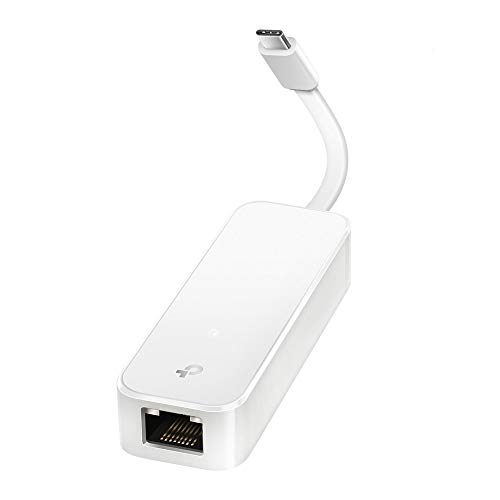
Description
TP-Link USB C To Ethernet Adapter(UE300C), RJ45 – Features & Prices in Saudi Arabia :
TP-Link USB C To Ethernet Adapter(UE300C), RJ45 To USB C Type-C Gigabit Ethernet LAN Network Adapter, Compatible With Apple MacBook Pro 2017-2020, MacBook Air, Surface, Dell XPS And More, White
Brand
TP-Link
Item model number
UE300C
Operating System
Windows 11/10/8.1/8/7, Chrome OS, MacOS, Linux (Ubuntu) for PCs, Macs, tablets
Item Weight
0.64 ounces
Product Dimensions
2.8 x 1 x 0.64 inches
Item Dimensions LxWxH
2.8 x 1 x 0.64 inches
Color
White
Manufacturer
TP-Link
ASIN
B08HQBC678
Country of Origin
China
Date First Available
August 11, 2020
Test video – TP-Link USB C To Ethernet Adapter(UE300C), RJ45 :
Product highlights :
Questions & Answers – TP-Link USB C To Ethernet Adapter(UE300C), RJ45 :
Technical specifications – TP-Link USB C To Ethernet Adapter(UE300C), RJ45 :
Brand
TP-Link
Hardware Interface
USB, Ethernet, USB 3.0
Operating System
Windows 11/10/8.1/8/7, Chrome OS, MacOS, Linux (Ubuntu) for PCs, Macs, tablets
Color
White
Compatible Devices
Laptop, Desktop, Tablet
Item Dimensions LxWxH
2.8 x 1 x 0.64 inches
Data Link Protocol
Ethernet, Gigabit Ethernet
Data Transfer Rate
1 Gigabits Per Second
Item Weight
0.04 Pounds
Purchase advice :
-
Warranty :
Check the duration of the warranty and also the faults and defects it covers. Is it complete or limited? and What is included in the warranty (parts, repairs or both)?
-
Shipping :
Is delivery offered? And how long does it take to get delivered (Delivery time)
-
Proof of purchase :
Does the shop give you an invoice ?
-
After-sales service :
Do they have an after-sales service to have information about the installation or operation (instructions for use). Also in case of problem, it is the seller who takes charge or you must contact the manufacturer or supplier yourself.
_____________________________


N. J (verified owner) –
Works well – Works well does what it is supposed to
C. T (verified owner) –
Great for M1 Macs – I got this because I thought the Ethernet was going out in my Thunderbolt dock. It works great. It turns out the dock is okay, but as a Tech a physical Ethernet port is indispensable for troubleshooting. Should be great on any Mac with an Apple Silicon chip.
L. O (verified owner) –
Good reputation. Inconsistent speeds. – The issue with these types of dongle’s is the self negotiating speeds. At first when plugged in you can get the actual speed of your router. But over time it seems to degradate and will not exceed 100 Mb per second. The only way to get above 100 Mb per second is the unplug the device wait a few seconds and then plug device back in. Then the speed returns to above 100 Mb per second. Plastic is not ideal for distributing heat. And he can affect the device. For the money there are better options out there.
B. K (verified owner) –
Perfect – son uses on his laptop and works with the lags
H. Z (verified owner) –
Plug n play LITERALLY – Easy to use
H. Z (verified owner) –
Plug n play LITERALLY – Easy to use
K. O (verified owner) –
Works great and very portable. – I own multiple dongles with a lot of other ports but this one is very comfortable to use since it is not very big, it is very portable. Great product that I would recommend to anyone.
L. N (verified owner) –
Reliable and fast – Using this as a replacement for a faulty NIC on my desktop, and has been very solid with no noticeable increase in latency or decrease in bandwidth. I’ve had no hiccups in several months of using this, and am getting full bandwidth (450mbps internet speed fully utilized) with no increase in latency that I’ve seen (done several speed tests compared with onboard NIC). It is plug and play with Windows 11, no need to manually install any drivers or software.
K. O (verified owner) –
Works great and very portable. – I own multiple dongles with a lot of other ports but this one is very comfortable to use since it is not very big, it is very portable. Great product that I would recommend to anyone.
L. N (verified owner) –
Reliable and fast – Using this as a replacement for a faulty NIC on my desktop, and has been very solid with no noticeable increase in latency or decrease in bandwidth. I’ve had no hiccups in several months of using this, and am getting full bandwidth (450mbps internet speed fully utilized) with no increase in latency that I’ve seen (done several speed tests compared with onboard NIC). It is plug and play with Windows 11, no need to manually install any drivers or software.
B. K (verified owner) –
Perfect – son uses on his laptop and works with the lags
L. O (verified owner) –
Good reputation. Inconsistent speeds. – The issue with these types of dongle’s is the self negotiating speeds. At first when plugged in you can get the actual speed of your router. But over time it seems to degradate and will not exceed 100 Mb per second. The only way to get above 100 Mb per second is the unplug the device wait a few seconds and then plug device back in. Then the speed returns to above 100 Mb per second. Plastic is not ideal for distributing heat. And he can affect the device. For the money there are better options out there.
Z. F (verified owner) –
It can overheat and not work – Lots of activity will do that
Z. F (verified owner) –
It can overheat and not work – Lots of activity will do that
N. J (verified owner) –
Works well – Works well does what it is supposed to
C. T (verified owner) –
Great for M1 Macs – I got this because I thought the Ethernet was going out in my Thunderbolt dock. It works great. It turns out the dock is okay, but as a Tech a physical Ethernet port is indispensable for troubleshooting. Should be great on any Mac with an Apple Silicon chip.