BrosTrend 1200Mbps Long Range USB WiFi Adapter – Features & Prices in Saudi Arabia :
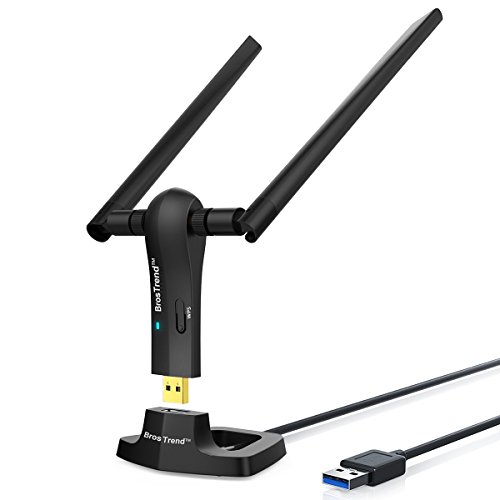
BrosTrend 1200Mbps Long Range USB WiFi Adapter for PC Desktop Laptop of Windows 11/10/8.1/8/7, USB Wireless Adapter Dual Band 2.4GHz 300Mbps + 5GHz 867Mbps, 2X 5dBi High Gain Antennas, USB 3.0 Cradle
Wireless Type
802.11a/b/g/n
Number of USB 3.0 Ports
1
Item model number
AC3
Operating System
Windows 11/10/8.1/8/7
Item Weight
2.4 ounces
Product Dimensions
3.7 x 3.9 x 6.9 inches
Item Dimensions LxWxH
3.7 x 3.9 x 6.9 inches
Color
Black
Power Source
Powered by USB Port of Desktop or Laptop PC
Voltage
5
Manufacturer
BrosTrend Technology LLC
ASIN
B01IEU7UZ0
Country of Origin
China
Is Discontinued By Manufacturer
No
Date First Available
July 14, 2016
Test video – BrosTrend 1200Mbps Long Range USB WiFi Adapter :
Product highlights :
ULTIMATE WI-FI SPEED: You Can Get 867Mbps Wireless Speed on 5GHz WiFi Band or 300Mbps Speed on 2.4GHz WiFi Band, Excellent for Online 4K Video, Gaming, High Quality Music and Facebook by Using this Dual Band USB WiFi Adapter
BOOST YOUR RANGE: Comes with 2 pieces of 5dBi High Gain Wifi Antennas, this Long Range WiFi Adapter Ensures Range Extended WiFi and Superior Stability on Your Desktop, Laptop, PC
FLEXIBLE DEPLOYMENT: Equipped with a USB 3.0 Cradle with Extension Cable of 5 Feet, Connect it to Any USB Ports of Your Desktop, Laptop or PC and Put this USB WiFi Network Adapter in Spot with Optimal WiFi Signal Reception; Or You Can Also Plug this USB WiFi Dongle Directly to Any USB Port of Your Desktops or Laptops
USB 3.0 PORT WITH GOLD PLATED: Comes with USB 3.0 Port which Works 10 Times Faster than USB 2.0; USB Port with Gold Plated Ensures More Stable and Solid Internet Connection; And it is Backward Compatible with USB 2.0 Port; Your Best WiFi Adapter for PC of Desktop and Laptop
UNIVERSAL COMPATIBILITY: This Wireless Adapter Works with Any WiFi Routers; Support Windows 11/10/8.1/8/7; *To Get OPTIMUM WIFI SPEED, Please Download Latest Driver on BrosTrend Official Web; Offers 7X24 Technical Support
ADVANCED WPA3 SECURITY: Secure Your Devices and Network Privacy by Supporting the Latest Wireless Encryption: WPA3-SAE, WPA2/WPA/WEP, AES/PSK/TKIP, 802.1x. Note: The chipset model number is Realtek RTL8812BU or RTL8822BU
Questions & Answers – BrosTrend 1200Mbps Long Range USB WiFi Adapter :
➕ What is the price of BrosTrend 1200Mbps Long Range USB WiFi Adapter in Saudi Arabia ?
The price of BrosTrend 1200Mbps Long Range USB WiFi Adapter in-store is 130 SAR VAT.
➕ When BrosTrend 1200Mbps Long Range USB WiFi Adapter was released ?
The release date was July 14, 2016.
➕ What is the price of BrosTrend 1200Mbps Long Range USB WiFi Adapter cheap used ?
The price of BrosTrend 1200Mbps Long Range USB WiFi Adapter used is 90 SAR VAT.
➕ What are the main characteristics of BrosTrend 1200Mbps Long Range USB WiFi Adapter ?
Special specifications :
ULTIMATE WI-FI SPEED: You Can Get 867Mbps Wireless Speed on 5GHz WiFi Band or 300Mbps Speed on 2.4GHz WiFi Band, Excellent for Online 4K Video, Gaming, High Quality Music and Facebook by Using this Dual Band USB WiFi Adapter
➕ Is it interesting to buy this product ?
The best people who can answer you are customers who have already bought and tested this product (See Customer Reviews). This product is rated 4.2 / 5 on Amazon.
➕ Where to buy BrosTrend 1200Mbps Long Range USB WiFi Adapter in Saudi Arabia ?
Technical specifications – BrosTrend 1200Mbps Long Range USB WiFi Adapter :
Antenna
2 X 5dBi High Gain WiFi Antennas
Brand
BrosTrend
Color
Black
Number of Channels
20
Item Dimensions LxWxH
3.7 x 3.9 x 6.9 inches
Purchase advice :
Warranty :
Check the duration of the warranty and also the faults and defects it covers. Is it complete or limited? and What is included in the warranty (parts, repairs or both)?
Shipping :
Is delivery offered? And how long does it take to get delivered (Delivery time)
Proof of purchase :
Does the shop give you an invoice ?
After-sales service :
Do they have an after-sales service to have information about the installation or operation (instructions for use). Also in case of problem, it is the seller who takes charge or you must contact the manufacturer or supplier yourself.
_____________________________
https://www.youtube.com/watch?v=aJ0oAx31W9g
16 reviews for BrosTrend 1200Mbps Long Range USB WiFi Adapter
Rated 5 out of 5
C. O (verified owner)–
What’s the frequency Kenneth? – I was having a terrible time getting a good Wi-Fi connection on my office computer, this did the trick, and then some! The Wi-Fi now gets connected and stays connected all day with the strongest signal I’ve ever had. This was definitely worth every penny of it really low and reasonable price
Rated 5 out of 5
T. K (verified owner)–
Really Impressed – Ordered this for a older couple in our church. Plugged it in … loaded the drivers on the supplied CD and boom…excellent wireless coverage. Their download speed was more than 10 times that of another competitor’s USB adapter! I liked this one because it just doesn’t hang out of a USB port putting strain on it…rather the desktop stand AND the two antennas really make this one a keeper!
Rated 5 out of 5
Z. C (verified owner)–
WOW! Boosted PC signal from 40% to 100% – I did not contact tech support, so can’t rate that. My PC is located near the floor between two metal frame desks. The metal interferes with my Starlink router signal and was always hovering between 20% and 40% Wi-Fi strength (the signal also passes through several closets and a pantry).
Rated 4 out of 5
B. B (verified owner)–
Adequate signal improvement; excellent support; stand is marginal – Using in an RV park with a laptop at a desk. Without any help, my laptop could see the park wifi, but only a Dot for signal strength and it couldn’t even connect to it (even though the antenna isn’t too far away). I got the best signal by taping the extended antenna high on a window. I used a command prompt: ‘netsh wlan show interfaces’ and adjusted arms and position with frequent re-taping until I got the signal strength to 53%, which is Dot plus 1 or sometimes 2 bars in Windows 10. With that I can logon and more. Because of my port positioning, I’m using a USB powered extender from a USB2 port and then extending that with their cord to the window location with line of sight to the antenna. At its best, I exceed 800,000 bytes/s download speeds. At worst, nothing — but I have no idea about 1) other users and 2) any park down-throttling after I’ve downloaded a significant amount. It usually does the higher speeds towards midnight, but not always. I have not tried uploading anything.
Rated 5 out of 5
C. O (verified owner)–
What’s the frequency Kenneth? – I was having a terrible time getting a good Wi-Fi connection on my office computer, this did the trick, and then some! The Wi-Fi now gets connected and stays connected all day with the strongest signal I’ve ever had. This was definitely worth every penny of it really low and reasonable price
Rated 5 out of 5
E. F (verified owner)–
It works for my purposes – I bought this to use with an older Dell PC that doesn’t have wireless connectivity, and it works like a charm. I work from home and haven’t noticed any decrease in speed when accessing my work computer remotely. In case this info is helpful to anyone out there: the PC is in a room at the opposite end of the house from the router (approx 80 ft away) with 3 walls between the two, the router is a Linksys EA7500, and the internet service is fiber-optic.
Rated 4 out of 5
K. F (verified owner)–
Desktop untethered – After moving to a new home and finding out the fiber was run to an area that was not located in an optimal area, I had to find another solution for my tower computer that did not have built in Wi-Fi. I was also concerned about the distance from the gateway and if the signal would reach an antenna that was located near the floor. I spotted the BrosTrend and decided to give it a try. The setup was quick and in no time at all I was pulling around 400mb of bandwidth to my computer. This saved me from having to have it setup in the dining room/foyer area so that it would have wired connection or having to run CAT6 to the back room. So far, no complaints from me.
Rated 5 out of 5
K. L (verified owner)–
Nice upgrade and fairly straightforward. – This WiFi adapter is pretty good. My old one was decent but maxed out at around 50% of my internet speed. I don’t have that problem with this adapter anymore. I was able to download an 80GB Steam game in about a 25 minutes. Before it could have been upwards of two hours.
Rated 4 out of 5
B. B (verified owner)–
Adequate signal improvement; excellent support; stand is marginal – Using in an RV park with a laptop at a desk. Without any help, my laptop could see the park wifi, but only a Dot for signal strength and it couldn’t even connect to it (even though the antenna isn’t too far away). I got the best signal by taping the extended antenna high on a window. I used a command prompt: ‘netsh wlan show interfaces’ and adjusted arms and position with frequent re-taping until I got the signal strength to 53%, which is Dot plus 1 or sometimes 2 bars in Windows 10. With that I can logon and more. Because of my port positioning, I’m using a USB powered extender from a USB2 port and then extending that with their cord to the window location with line of sight to the antenna. At its best, I exceed 800,000 bytes/s download speeds. At worst, nothing — but I have no idea about 1) other users and 2) any park down-throttling after I’ve downloaded a significant amount. It usually does the higher speeds towards midnight, but not always. I have not tried uploading anything.
Rated 5 out of 5
Z. C (verified owner)–
WOW! Boosted PC signal from 40% to 100% – I did not contact tech support, so can’t rate that. My PC is located near the floor between two metal frame desks. The metal interferes with my Starlink router signal and was always hovering between 20% and 40% Wi-Fi strength (the signal also passes through several closets and a pantry).
Rated 5 out of 5
E. F (verified owner)–
It works for my purposes – I bought this to use with an older Dell PC that doesn’t have wireless connectivity, and it works like a charm. I work from home and haven’t noticed any decrease in speed when accessing my work computer remotely. In case this info is helpful to anyone out there: the PC is in a room at the opposite end of the house from the router (approx 80 ft away) with 3 walls between the two, the router is a Linksys EA7500, and the internet service is fiber-optic.
Rated 4 out of 5
K. L (verified owner)–
Easy to set up. Worked as expected. – Arrived same day, set up was easy
Rated 5 out of 5
K. L (verified owner)–
Nice upgrade and fairly straightforward. – This WiFi adapter is pretty good. My old one was decent but maxed out at around 50% of my internet speed. I don’t have that problem with this adapter anymore. I was able to download an 80GB Steam game in about a 25 minutes. Before it could have been upwards of two hours.
Rated 5 out of 5
T. K (verified owner)–
Really Impressed – Ordered this for a older couple in our church. Plugged it in … loaded the drivers on the supplied CD and boom…excellent wireless coverage. Their download speed was more than 10 times that of another competitor’s USB adapter! I liked this one because it just doesn’t hang out of a USB port putting strain on it…rather the desktop stand AND the two antennas really make this one a keeper!
Rated 4 out of 5
K. F (verified owner)–
Desktop untethered – After moving to a new home and finding out the fiber was run to an area that was not located in an optimal area, I had to find another solution for my tower computer that did not have built in Wi-Fi. I was also concerned about the distance from the gateway and if the signal would reach an antenna that was located near the floor. I spotted the BrosTrend and decided to give it a try. The setup was quick and in no time at all I was pulling around 400mb of bandwidth to my computer. This saved me from having to have it setup in the dining room/foyer area so that it would have wired connection or having to run CAT6 to the back room. So far, no complaints from me.
Rated 4 out of 5
K. L (verified owner)–
Easy to set up. Worked as expected. – Arrived same day, set up was easy

C. O (verified owner) –
What’s the frequency Kenneth? – I was having a terrible time getting a good Wi-Fi connection on my office computer, this did the trick, and then some! The Wi-Fi now gets connected and stays connected all day with the strongest signal I’ve ever had. This was definitely worth every penny of it really low and reasonable price
T. K (verified owner) –
Really Impressed – Ordered this for a older couple in our church. Plugged it in … loaded the drivers on the supplied CD and boom…excellent wireless coverage. Their download speed was more than 10 times that of another competitor’s USB adapter! I liked this one because it just doesn’t hang out of a USB port putting strain on it…rather the desktop stand AND the two antennas really make this one a keeper!
Z. C (verified owner) –
WOW! Boosted PC signal from 40% to 100% – I did not contact tech support, so can’t rate that. My PC is located near the floor between two metal frame desks. The metal interferes with my Starlink router signal and was always hovering between 20% and 40% Wi-Fi strength (the signal also passes through several closets and a pantry).
B. B (verified owner) –
Adequate signal improvement; excellent support; stand is marginal – Using in an RV park with a laptop at a desk. Without any help, my laptop could see the park wifi, but only a Dot for signal strength and it couldn’t even connect to it (even though the antenna isn’t too far away). I got the best signal by taping the extended antenna high on a window. I used a command prompt: ‘netsh wlan show interfaces’ and adjusted arms and position with frequent re-taping until I got the signal strength to 53%, which is Dot plus 1 or sometimes 2 bars in Windows 10. With that I can logon and more. Because of my port positioning, I’m using a USB powered extender from a USB2 port and then extending that with their cord to the window location with line of sight to the antenna. At its best, I exceed 800,000 bytes/s download speeds. At worst, nothing — but I have no idea about 1) other users and 2) any park down-throttling after I’ve downloaded a significant amount. It usually does the higher speeds towards midnight, but not always. I have not tried uploading anything.
C. O (verified owner) –
What’s the frequency Kenneth? – I was having a terrible time getting a good Wi-Fi connection on my office computer, this did the trick, and then some! The Wi-Fi now gets connected and stays connected all day with the strongest signal I’ve ever had. This was definitely worth every penny of it really low and reasonable price
E. F (verified owner) –
It works for my purposes – I bought this to use with an older Dell PC that doesn’t have wireless connectivity, and it works like a charm. I work from home and haven’t noticed any decrease in speed when accessing my work computer remotely. In case this info is helpful to anyone out there: the PC is in a room at the opposite end of the house from the router (approx 80 ft away) with 3 walls between the two, the router is a Linksys EA7500, and the internet service is fiber-optic.
K. F (verified owner) –
Desktop untethered – After moving to a new home and finding out the fiber was run to an area that was not located in an optimal area, I had to find another solution for my tower computer that did not have built in Wi-Fi. I was also concerned about the distance from the gateway and if the signal would reach an antenna that was located near the floor. I spotted the BrosTrend and decided to give it a try. The setup was quick and in no time at all I was pulling around 400mb of bandwidth to my computer. This saved me from having to have it setup in the dining room/foyer area so that it would have wired connection or having to run CAT6 to the back room. So far, no complaints from me.
K. L (verified owner) –
Nice upgrade and fairly straightforward. – This WiFi adapter is pretty good. My old one was decent but maxed out at around 50% of my internet speed. I don’t have that problem with this adapter anymore. I was able to download an 80GB Steam game in about a 25 minutes. Before it could have been upwards of two hours.
B. B (verified owner) –
Adequate signal improvement; excellent support; stand is marginal – Using in an RV park with a laptop at a desk. Without any help, my laptop could see the park wifi, but only a Dot for signal strength and it couldn’t even connect to it (even though the antenna isn’t too far away). I got the best signal by taping the extended antenna high on a window. I used a command prompt: ‘netsh wlan show interfaces’ and adjusted arms and position with frequent re-taping until I got the signal strength to 53%, which is Dot plus 1 or sometimes 2 bars in Windows 10. With that I can logon and more. Because of my port positioning, I’m using a USB powered extender from a USB2 port and then extending that with their cord to the window location with line of sight to the antenna. At its best, I exceed 800,000 bytes/s download speeds. At worst, nothing — but I have no idea about 1) other users and 2) any park down-throttling after I’ve downloaded a significant amount. It usually does the higher speeds towards midnight, but not always. I have not tried uploading anything.
Z. C (verified owner) –
WOW! Boosted PC signal from 40% to 100% – I did not contact tech support, so can’t rate that. My PC is located near the floor between two metal frame desks. The metal interferes with my Starlink router signal and was always hovering between 20% and 40% Wi-Fi strength (the signal also passes through several closets and a pantry).
E. F (verified owner) –
It works for my purposes – I bought this to use with an older Dell PC that doesn’t have wireless connectivity, and it works like a charm. I work from home and haven’t noticed any decrease in speed when accessing my work computer remotely. In case this info is helpful to anyone out there: the PC is in a room at the opposite end of the house from the router (approx 80 ft away) with 3 walls between the two, the router is a Linksys EA7500, and the internet service is fiber-optic.
K. L (verified owner) –
Easy to set up. Worked as expected. – Arrived same day, set up was easy
K. L (verified owner) –
Nice upgrade and fairly straightforward. – This WiFi adapter is pretty good. My old one was decent but maxed out at around 50% of my internet speed. I don’t have that problem with this adapter anymore. I was able to download an 80GB Steam game in about a 25 minutes. Before it could have been upwards of two hours.
T. K (verified owner) –
Really Impressed – Ordered this for a older couple in our church. Plugged it in … loaded the drivers on the supplied CD and boom…excellent wireless coverage. Their download speed was more than 10 times that of another competitor’s USB adapter! I liked this one because it just doesn’t hang out of a USB port putting strain on it…rather the desktop stand AND the two antennas really make this one a keeper!
K. F (verified owner) –
Desktop untethered – After moving to a new home and finding out the fiber was run to an area that was not located in an optimal area, I had to find another solution for my tower computer that did not have built in Wi-Fi. I was also concerned about the distance from the gateway and if the signal would reach an antenna that was located near the floor. I spotted the BrosTrend and decided to give it a try. The setup was quick and in no time at all I was pulling around 400mb of bandwidth to my computer. This saved me from having to have it setup in the dining room/foyer area so that it would have wired connection or having to run CAT6 to the back room. So far, no complaints from me.
K. L (verified owner) –
Easy to set up. Worked as expected. – Arrived same day, set up was easy