Description
SofaBaton U1 Universal Remote with OLED Display – Features & Prices in Saudi Arabia :
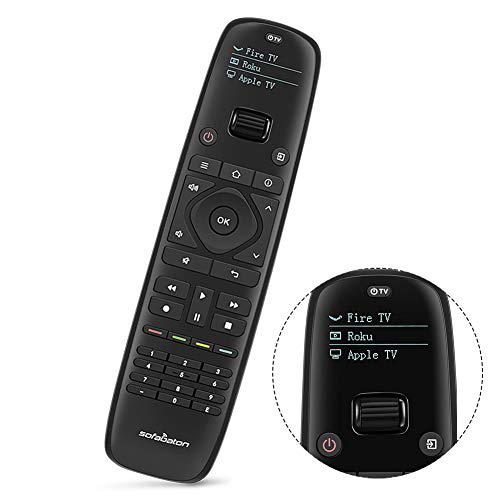
SofaBaton U1 Universal Remote with OLED Display and Smartphone APP, All in One Universal Remote Control for up to 15 Entertainment Devices, Compatible with Smart TVs/DVD/STB/Projector so on
2 AA batteries required. (included)
Test video – SofaBaton U1 Universal Remote with OLED Display :
Product highlights :
【U1 Universal Remote & Replaces 15 Other Remotes】Our unique remote control support 500,000+ devices from 6000+ brands, the database will update as new devices come out, you don’t need to worry about the newest device doesn’t match. Both compatible both IR and Blutooth, Not support Wireless or Wifi (Such as Ruku Stick). Say goodbye to that jumble of remotes once and for all
【App One-Touch Set Up】SofaBaton customized smartphone APP, one-button settings, no need to enter complex code to pair. Simple control for the whole house only by one remote, ditch all your complex remotes, just one remote for you. Compatible with / Ruku/ Kodi and other smart TV、STB 、Projector、DVD、AV Receiver and so on
【OLED Display & Motion-Activated Function】The bright color OLED screen directly displays the current status and convenient for switching different devices. The motion-activated feature can automatically adjust the remote control brightness and save energy to gain longer battery life. A unique wheel design can easily switch devices just with a simple scroll. You must own this universal U1 remote!!!
【Multiple Commands by One Macro Button】With one macro button push, it can output multiple commands. How excited when you just press a button and it can implement a series of operations one or between different remotes. And you can also customize the start time, for example, if you want to open your TV firstly and then turn on your set-top box after 5 seconds
【After Service】SofaBaton offers 12 months warranty for exchange or refund service. If there are any problems, please feel free to contact us via the customer service email enclosed or call us for the highest quality and outstanding customer support. And we will provide you with instructions or specific video steps or other detailed solutions within 24 hours 🙂
Questions & Answers – SofaBaton U1 Universal Remote with OLED Display :
➕ What is the price of SofaBaton U1 Universal Remote with OLED Display in Saudi Arabia ?
The price of SofaBaton U1 Universal Remote with OLED Display in-store is 190 SAR VAT.
➕ When SofaBaton U1 Universal Remote with OLED Display was released ?
The release date was September 4, 2019.
➕ What is the price of SofaBaton U1 Universal Remote with OLED Display cheap used ?
The price of SofaBaton U1 Universal Remote with OLED Display used is 130 SAR VAT.
➕ What are the main characteristics of SofaBaton U1 Universal Remote with OLED Display ?
Special specifications :
【U1 Universal Remote & Replaces 15 Other Remotes】Our unique remote control support 500,000+ devices from 6000+ brands, the database will update as new devices come out, you don’t need to worry about the newest device doesn’t match. Both compatible both IR and Blutooth, Not support Wireless or Wifi (Such as Ruku Stick). Say goodbye to that jumble of remotes once and for all
➕ Is it interesting to buy this product ?
The best people who can answer you are customers who have already bought and tested
this product (
See Customer Reviews). This product is rated 3.7 / 5
on Amazon.
➕ Where to buy SofaBaton U1 Universal Remote with OLED Display in Saudi Arabia ?
Mall, Supermarkets, Amazon, Specialized stores, ….
Technical specifications – SofaBaton U1 Universal Remote with OLED Display :
Max Number of Supported Devices
Purchase advice :
-
Warranty :
Check the duration of the warranty and also the faults and defects it covers. Is it complete or limited? and What is included in the warranty (parts, repairs or both)?
-
Shipping :
Is delivery offered? And how long does it take to get delivered (Delivery time)
-
Proof of purchase :
Does the shop give you an invoice ?
-
After-sales service :
Do they have an after-sales service to have information about the installation or operation (instructions for use). Also in case of problem, it is the seller who takes charge or you must contact the manufacturer or supplier yourself.
_____________________________

H. G (verified owner) –
Room for improvement: an UPDATED review – UPDATE
S. P (verified owner) –
Migrating from a Harmony Remote 650 – it’s same, but different – Coming from a Harmony 650, I was hoping this remote would have some of the same “we’ll ask you questions, and that will set macros” capability, but it works differently. Instead of setting up activities, you add devices and alter what a button press does,
J. Z (verified owner) –
– Easy to set up, battery life is good.
O. Z (verified owner) –
SofaBaton remote review – I bought this remote to replace my Logitech Harmony 650 that was showing signs of wear with some buttons requiring multiple inputs before they would work. If you have not used the Logitech products then you will not know my expectations for a multi device remote is very high, that said let’s review the SofaBaton product. Having watched a YouTube video prior to ordering the remote I had a good idea of how to set up the device. First step was to set up the equipment I wanted the remote to operate. I have Directv, and four other components. After testing the remote with the individual components I noticed that because some of my equipment is older the setup of the device on the remote was missing some settings, not a problem I could have used their tech support but chose to use a quicker method of using the old remote to teach the new remote the settings required. Simple to do and works very well. Then I started to put together the macros required so that when I want to watch TV I turn on three devices, turn off any devices not required and set my TV and amp to the correct settings. The macro is not difficult to set up but is does take some thought as to the steps you want to accomplish. Picking which remote button to assign the macro, and the steps requires some thought. Using my old remote as my example I have one button that runs the on macro for TV and one button that turns off all of the devices. I found that I had to program other buttons for the on and off settings for my devices so I picked the number buttons on the remote for another device that does not have channels and used those button settings in the macro. I know clear as mud but once you start to work with the remote this will make more sense. The set up was not difficult but again it takes planning and you can always go back and modify the set up if you find something is not working as planned. I have now used the remote for about a month and here are my comments on how the remote functions. I have to be more precise with were I hold the remote to operate my equipment, not a big deal but I feel either the signal is not as strong or does not broadcast as wide as my old remote. All of my units are in a cabinet behind glass so this could also play into the reason why I have to be more precise in placement of the remote during usage. The buttons are a little stiff on the remote, not a big deal just an observation. Some buttons are small and close together on the remote this is true for the number buttons, so changing the channel if you know the station is harder then it needs to be if the keys were bigger. The remote during some functions sends the information to the equipment multiple times. This could just be a Directv thing but if I push a channel button I will see the number appear as multiple digits when it is a single digit channel number. With the same number being repeated multiple times. This multiple thing is true for a couple other buttons such as the Directv guide which pops up then goes to a second screen where I have to select the function and press the OK key. Still all this is workable just a little frustrating. So I gave the remote a four stars as it is good but not great. That said given the competition on the market it is a good choice just wish they would make it a little larger so that key spacing could improve.
O. Z (verified owner) –
SofaBaton remote review – I bought this remote to replace my Logitech Harmony 650 that was showing signs of wear with some buttons requiring multiple inputs before they would work. If you have not used the Logitech products then you will not know my expectations for a multi device remote is very high, that said let’s review the SofaBaton product. Having watched a YouTube video prior to ordering the remote I had a good idea of how to set up the device. First step was to set up the equipment I wanted the remote to operate. I have Directv, and four other components. After testing the remote with the individual components I noticed that because some of my equipment is older the setup of the device on the remote was missing some settings, not a problem I could have used their tech support but chose to use a quicker method of using the old remote to teach the new remote the settings required. Simple to do and works very well. Then I started to put together the macros required so that when I want to watch TV I turn on three devices, turn off any devices not required and set my TV and amp to the correct settings. The macro is not difficult to set up but is does take some thought as to the steps you want to accomplish. Picking which remote button to assign the macro, and the steps requires some thought. Using my old remote as my example I have one button that runs the on macro for TV and one button that turns off all of the devices. I found that I had to program other buttons for the on and off settings for my devices so I picked the number buttons on the remote for another device that does not have channels and used those button settings in the macro. I know clear as mud but once you start to work with the remote this will make more sense. The set up was not difficult but again it takes planning and you can always go back and modify the set up if you find something is not working as planned. I have now used the remote for about a month and here are my comments on how the remote functions. I have to be more precise with were I hold the remote to operate my equipment, not a big deal but I feel either the signal is not as strong or does not broadcast as wide as my old remote. All of my units are in a cabinet behind glass so this could also play into the reason why I have to be more precise in placement of the remote during usage. The buttons are a little stiff on the remote, not a big deal just an observation. Some buttons are small and close together on the remote this is true for the number buttons, so changing the channel if you know the station is harder then it needs to be if the keys were bigger. The remote during some functions sends the information to the equipment multiple times. This could just be a Directv thing but if I push a channel button I will see the number appear as multiple digits when it is a single digit channel number. With the same number being repeated multiple times. This multiple thing is true for a couple other buttons such as the Directv guide which pops up then goes to a second screen where I have to select the function and press the OK key. Still all this is workable just a little frustrating. So I gave the remote a four stars as it is good but not great. That said given the competition on the market it is a good choice just wish they would make it a little larger so that key spacing could improve.
S. H (verified owner) –
– Regardless of what a previous review stated I have received the sofabaton today and I could not get it to work with the SKY Q box. I input the model and it came up with a command on the phone app but when I pressed the button it transferred the signal to the sofabaton but then it did not operate the box. Shame as otherwise it looked like a really good product and idea.
J. Z (verified owner) –
– Easy to set up, battery life is good.
H. G (verified owner) –
Room for improvement: an UPDATED review – UPDATE
S. P (verified owner) –
Migrating from a Harmony Remote 650 – it’s same, but different – Coming from a Harmony 650, I was hoping this remote would have some of the same “we’ll ask you questions, and that will set macros” capability, but it works differently. Instead of setting up activities, you add devices and alter what a button press does,
S. H (verified owner) –
– Regardless of what a previous review stated I have received the sofabaton today and I could not get it to work with the SKY Q box. I input the model and it came up with a command on the phone app but when I pressed the button it transferred the signal to the sofabaton but then it did not operate the box. Shame as otherwise it looked like a really good product and idea.