TP-Link USB WiFi Adapter, AC1300Mbps Dual Band – Features & Prices in Saudi Arabia :
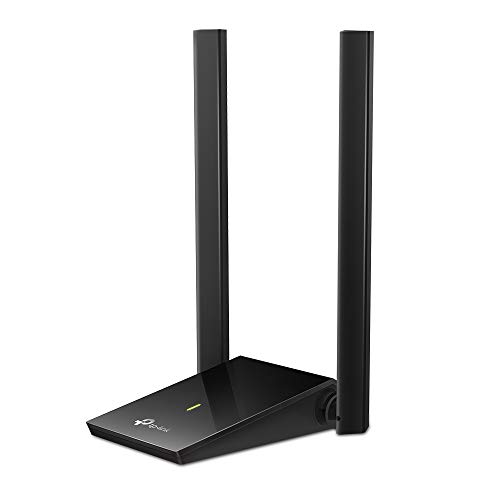
TP-Link USB WiFi Adapter, AC1300Mbps Dual Band 5dBi High Gain Antenna 2.4GHz/ 5GHz Wireless Network Adapter for Desktop PC (Archer T4U Plus)- Supports Windows 11/10/8.1/8/7, Mac OS 10.9 – 10.14
Wireless Type
802.11n, 802.11b, 802.11a, 802.11ac, 802.11g
Series
Archer T4U Plus
Item model number
Archer T4U Plus
Operating System
Windows 11/10/8.1/8/7 and macOS X 10.9 – 10.14
Item Weight
2.4 ounces
Product Dimensions
3.31 x 6.15 x 0.76 inches
Item Dimensions LxWxH
3.31 x 6.15 x 0.76 inches
Color
Black
Manufacturer
TP-Link
ASIN
B08KHV7H1S
Country of Origin
Vietnam
Date First Available
October 1, 2020
Test video – TP-Link USB WiFi Adapter, AC1300Mbps Dual Band :
Product highlights :
Super-Fast WiFi: AC1300 wireless speeds to meet all your gaming, downloading, and streaming needs
Dual Band USB WiFi Dongle: 2.4GHz and 5GHz bands for flexible connectivity (400Mpbs on the 2.4GHz band and 867Mbps on the 5GHz band)
Dual High-Gain Antennas: Improved range, signal quality and transmission performance, ideal USB wifi adapter for desktop pc
MU-MIMO: Delivers highly efficient wireless connection, perfect for busy networks
Wireless USB Wifi Adapter with Super Speed USB 3.0 Port: Up to 10x faster transfer speeds than USB 2.0
Adjustable, Multi-Directional Antenna: Enable flexible deployment for the best reception with adjustable antennas and flexible desktop design
Questions & Answers – TP-Link USB WiFi Adapter, AC1300Mbps Dual Band :
➕ What is the price of TP-Link USB WiFi Adapter, AC1300Mbps Dual Band in Saudi Arabia ?
The price of TP-Link USB WiFi Adapter, AC1300Mbps Dual Band in-store is 90 SAR VAT.
➕ When TP-Link USB WiFi Adapter, AC1300Mbps Dual Band was released ?
The release date was October 1, 2020.
➕ What is the price of TP-Link USB WiFi Adapter, AC1300Mbps Dual Band cheap used ?
The price of TP-Link USB WiFi Adapter, AC1300Mbps Dual Band used is 60 SAR VAT.
➕ What are the main characteristics of TP-Link USB WiFi Adapter, AC1300Mbps Dual Band ?
Special specifications :
Super-Fast WiFi: AC1300 wireless speeds to meet all your gaming, downloading, and streaming needs
➕ Is it interesting to buy this product ?
The best people who can answer you are customers who have already bought and tested this product (See Customer Reviews). This product is rated 4.5 / 5 on Amazon.
➕ Where to buy TP-Link USB WiFi Adapter, AC1300Mbps Dual Band in Saudi Arabia ?
Technical specifications – TP-Link USB WiFi Adapter, AC1300Mbps Dual Band :
Brand
TP-Link
Hardware Interface
USB, USB 3.0, USB 2.0
Operating System
Windows 11/10/8.1/8/7 and macOS X 10.9 – 10.14
Color
Black
Compatible Devices
Desktop
Item Dimensions LxWxH
3.31 x 6.15 x 0.76 inches
Data Link Protocol
USB
Data Transfer Rate
1267 Megabits Per Second
Item Weight
0.15 Pounds
Purchase advice :
Warranty :
Check the duration of the warranty and also the faults and defects it covers. Is it complete or limited? and What is included in the warranty (parts, repairs or both)?
Shipping :
Is delivery offered? And how long does it take to get delivered (Delivery time)
Proof of purchase :
Does the shop give you an invoice ?
After-sales service :
Do they have an after-sales service to have information about the installation or operation (instructions for use). Also in case of problem, it is the seller who takes charge or you must contact the manufacturer or supplier yourself.
_____________________________
16 reviews for TP-Link USB WiFi Adapter, AC1300Mbps Dual Band
Rated 5 out of 5
E. I (verified owner)–
Improved speed on 5ghz from 40Mbps to 300+Mbps – I have a mini pc that has a built in realtek 8821ce wifi card built in. I have Xfinity internet with a 1000Mbps plan. I was getting abour 40-50Mbps on both the 2.4ghz and 5ghz signal from my Asus router. I ordered this TP-Link Wifi adapter and received it the same day. Installation was simple – connect the USB cord and run the software. I now consistently get 300-400Mbps on my 5ghz channel and get around 100Mbps on my 2.4ghz channel. I am very impressed.
Rated 5 out of 5
J. B (verified owner)–
Converted older desktop to wireless. – This works great to convert my old wired desktop to allow wireless operation now that I moved the old modem/router to a more central location to improve reception to other wifi devices. I replaced the old modem router with a newer one and centrally located it to other wireless devices like my laptop and roku and smart tv. I regained wireless capability on my old desktop by adding this easy device. I would not tell you that the speed is great, but I don’t use it to watch video or play games so I can not speak to that. I am happy to be able to use it for a backup.
Rated 5 out of 5
M. H (verified owner)–
perfect – this thing is super cool. it worked for what i needed it for and that was extending my range. it was cool too because i have windows 11 i didn’t even need to install. i just plugged it in and the thing started working. im using it on my laptop and it now reads “wifi1” and “wifi2”. i already have a wifi card in my laptop but this is way better for those hard to reach routers. im happy.
Rated 5 out of 5
E. M (verified owner)–
Very good WiFi adapter – My home is a townhouse and the internet router is installed in the garage. My desktop computer is in the kitchen upstairs. My old 802.11n WiFi adapter does not do a good job, and that is why I have to get a new adapter. This 802.11ac adapter can provide up to 150 Mbps internet speed to my desktop, half the 300 Mbps speed the router can provide.
Rated 4 out of 5
F. H (verified owner)–
Solid with occasional latency issues – Pros:
Rated 5 out of 5
E. M (verified owner)–
Very good WiFi adapter – My home is a townhouse and the internet router is installed in the garage. My desktop computer is in the kitchen upstairs. My old 802.11n WiFi adapter does not do a good job, and that is why I have to get a new adapter. This 802.11ac adapter can provide up to 150 Mbps internet speed to my desktop, half the 300 Mbps speed the router can provide.
Rated 5 out of 5
H. M (verified owner)–
Works fine – Bought this a few years ago for the farthest rooms in our house. Works fine in tandem with TP Link Router. My kids are gamers, so we have over a couple gigs of internet cable. The adapter amplifies the signal for my oldest, and we haven’t gotten any lag complaints.
Rated 4 out of 5
F. H (verified owner)–
Solid with occasional latency issues – Pros:
Rated 5 out of 5
H. M (verified owner)–
Works fine – Bought this a few years ago for the farthest rooms in our house. Works fine in tandem with TP Link Router. My kids are gamers, so we have over a couple gigs of internet cable. The adapter amplifies the signal for my oldest, and we haven’t gotten any lag complaints.
Rated 5 out of 5
T. C (verified owner)–
Thick walls? No problem – I bought this as a replacement for my old tp link wifi adapter because of constant Wi-Fi dropping and lagging in game.
Rated 5 out of 5
J. B (verified owner)–
Converted older desktop to wireless. – This works great to convert my old wired desktop to allow wireless operation now that I moved the old modem/router to a more central location to improve reception to other wifi devices. I replaced the old modem router with a newer one and centrally located it to other wireless devices like my laptop and roku and smart tv. I regained wireless capability on my old desktop by adding this easy device. I would not tell you that the speed is great, but I don’t use it to watch video or play games so I can not speak to that. I am happy to be able to use it for a backup.
Rated 5 out of 5
E. I (verified owner)–
Improved speed on 5ghz from 40Mbps to 300+Mbps – I have a mini pc that has a built in realtek 8821ce wifi card built in. I have Xfinity internet with a 1000Mbps plan. I was getting abour 40-50Mbps on both the 2.4ghz and 5ghz signal from my Asus router. I ordered this TP-Link Wifi adapter and received it the same day. Installation was simple – connect the USB cord and run the software. I now consistently get 300-400Mbps on my 5ghz channel and get around 100Mbps on my 2.4ghz channel. I am very impressed.
Rated 5 out of 5
S. M (verified owner)–
Much improved performance – I got much better performance with this WiFi antenna than my previous antenna. The previous was a on-element, USB attached, antenna that just plugs into a USB slot in the back of the desktop. This antenna was easy to install, just plug it in, install the drivers from the included CD, and it came up immediately. I have been fairly happy with a modest 20Gb internet service, but when I installed a new computer, my cloud backup software wanted to upload my entire data drive (this is good). So, my internet connection has been swamped for days with uploading GBs of data, and it effected everything else using WiFi – Streaming TV, browser activity (YT, FB, Video Chats, routine stuff, accounts). I monitored network activity with perfmon, because things were really affected by this uploading running in the background. After installing this new antenna, my overall network byte-count thruput went up materially, and the other apps that were running became smooth, and much closer to acceptable. The uploads are running much faster, as the bytecount increased.
Rated 5 out of 5
S. M (verified owner)–
Much improved performance – I got much better performance with this WiFi antenna than my previous antenna. The previous was a on-element, USB attached, antenna that just plugs into a USB slot in the back of the desktop. This antenna was easy to install, just plug it in, install the drivers from the included CD, and it came up immediately. I have been fairly happy with a modest 20Gb internet service, but when I installed a new computer, my cloud backup software wanted to upload my entire data drive (this is good). So, my internet connection has been swamped for days with uploading GBs of data, and it effected everything else using WiFi – Streaming TV, browser activity (YT, FB, Video Chats, routine stuff, accounts). I monitored network activity with perfmon, because things were really affected by this uploading running in the background. After installing this new antenna, my overall network byte-count thruput went up materially, and the other apps that were running became smooth, and much closer to acceptable. The uploads are running much faster, as the bytecount increased.
Rated 5 out of 5
M. H (verified owner)–
perfect – this thing is super cool. it worked for what i needed it for and that was extending my range. it was cool too because i have windows 11 i didn’t even need to install. i just plugged it in and the thing started working. im using it on my laptop and it now reads “wifi1” and “wifi2”. i already have a wifi card in my laptop but this is way better for those hard to reach routers. im happy.
Rated 5 out of 5
T. C (verified owner)–
Thick walls? No problem – I bought this as a replacement for my old tp link wifi adapter because of constant Wi-Fi dropping and lagging in game.
E. I (verified owner) –
Improved speed on 5ghz from 40Mbps to 300+Mbps – I have a mini pc that has a built in realtek 8821ce wifi card built in. I have Xfinity internet with a 1000Mbps plan. I was getting abour 40-50Mbps on both the 2.4ghz and 5ghz signal from my Asus router. I ordered this TP-Link Wifi adapter and received it the same day. Installation was simple – connect the USB cord and run the software. I now consistently get 300-400Mbps on my 5ghz channel and get around 100Mbps on my 2.4ghz channel. I am very impressed.
J. B (verified owner) –
Converted older desktop to wireless. – This works great to convert my old wired desktop to allow wireless operation now that I moved the old modem/router to a more central location to improve reception to other wifi devices. I replaced the old modem router with a newer one and centrally located it to other wireless devices like my laptop and roku and smart tv. I regained wireless capability on my old desktop by adding this easy device. I would not tell you that the speed is great, but I don’t use it to watch video or play games so I can not speak to that. I am happy to be able to use it for a backup.
M. H (verified owner) –
perfect – this thing is super cool. it worked for what i needed it for and that was extending my range. it was cool too because i have windows 11 i didn’t even need to install. i just plugged it in and the thing started working. im using it on my laptop and it now reads “wifi1” and “wifi2”. i already have a wifi card in my laptop but this is way better for those hard to reach routers. im happy.
E. M (verified owner) –
Very good WiFi adapter – My home is a townhouse and the internet router is installed in the garage. My desktop computer is in the kitchen upstairs. My old 802.11n WiFi adapter does not do a good job, and that is why I have to get a new adapter. This 802.11ac adapter can provide up to 150 Mbps internet speed to my desktop, half the 300 Mbps speed the router can provide.
F. H (verified owner) –
Solid with occasional latency issues – Pros:
E. M (verified owner) –
Very good WiFi adapter – My home is a townhouse and the internet router is installed in the garage. My desktop computer is in the kitchen upstairs. My old 802.11n WiFi adapter does not do a good job, and that is why I have to get a new adapter. This 802.11ac adapter can provide up to 150 Mbps internet speed to my desktop, half the 300 Mbps speed the router can provide.
H. M (verified owner) –
Works fine – Bought this a few years ago for the farthest rooms in our house. Works fine in tandem with TP Link Router. My kids are gamers, so we have over a couple gigs of internet cable. The adapter amplifies the signal for my oldest, and we haven’t gotten any lag complaints.
F. H (verified owner) –
Solid with occasional latency issues – Pros:
H. M (verified owner) –
Works fine – Bought this a few years ago for the farthest rooms in our house. Works fine in tandem with TP Link Router. My kids are gamers, so we have over a couple gigs of internet cable. The adapter amplifies the signal for my oldest, and we haven’t gotten any lag complaints.
T. C (verified owner) –
Thick walls? No problem – I bought this as a replacement for my old tp link wifi adapter because of constant Wi-Fi dropping and lagging in game.
J. B (verified owner) –
Converted older desktop to wireless. – This works great to convert my old wired desktop to allow wireless operation now that I moved the old modem/router to a more central location to improve reception to other wifi devices. I replaced the old modem router with a newer one and centrally located it to other wireless devices like my laptop and roku and smart tv. I regained wireless capability on my old desktop by adding this easy device. I would not tell you that the speed is great, but I don’t use it to watch video or play games so I can not speak to that. I am happy to be able to use it for a backup.
E. I (verified owner) –
Improved speed on 5ghz from 40Mbps to 300+Mbps – I have a mini pc that has a built in realtek 8821ce wifi card built in. I have Xfinity internet with a 1000Mbps plan. I was getting abour 40-50Mbps on both the 2.4ghz and 5ghz signal from my Asus router. I ordered this TP-Link Wifi adapter and received it the same day. Installation was simple – connect the USB cord and run the software. I now consistently get 300-400Mbps on my 5ghz channel and get around 100Mbps on my 2.4ghz channel. I am very impressed.
S. M (verified owner) –
Much improved performance – I got much better performance with this WiFi antenna than my previous antenna. The previous was a on-element, USB attached, antenna that just plugs into a USB slot in the back of the desktop. This antenna was easy to install, just plug it in, install the drivers from the included CD, and it came up immediately. I have been fairly happy with a modest 20Gb internet service, but when I installed a new computer, my cloud backup software wanted to upload my entire data drive (this is good). So, my internet connection has been swamped for days with uploading GBs of data, and it effected everything else using WiFi – Streaming TV, browser activity (YT, FB, Video Chats, routine stuff, accounts). I monitored network activity with perfmon, because things were really affected by this uploading running in the background. After installing this new antenna, my overall network byte-count thruput went up materially, and the other apps that were running became smooth, and much closer to acceptable. The uploads are running much faster, as the bytecount increased.
S. M (verified owner) –
Much improved performance – I got much better performance with this WiFi antenna than my previous antenna. The previous was a on-element, USB attached, antenna that just plugs into a USB slot in the back of the desktop. This antenna was easy to install, just plug it in, install the drivers from the included CD, and it came up immediately. I have been fairly happy with a modest 20Gb internet service, but when I installed a new computer, my cloud backup software wanted to upload my entire data drive (this is good). So, my internet connection has been swamped for days with uploading GBs of data, and it effected everything else using WiFi – Streaming TV, browser activity (YT, FB, Video Chats, routine stuff, accounts). I monitored network activity with perfmon, because things were really affected by this uploading running in the background. After installing this new antenna, my overall network byte-count thruput went up materially, and the other apps that were running became smooth, and much closer to acceptable. The uploads are running much faster, as the bytecount increased.
M. H (verified owner) –
perfect – this thing is super cool. it worked for what i needed it for and that was extending my range. it was cool too because i have windows 11 i didn’t even need to install. i just plugged it in and the thing started working. im using it on my laptop and it now reads “wifi1” and “wifi2”. i already have a wifi card in my laptop but this is way better for those hard to reach routers. im happy.
T. C (verified owner) –
Thick walls? No problem – I bought this as a replacement for my old tp link wifi adapter because of constant Wi-Fi dropping and lagging in game.