TP-Link USB WiFi Adapter for Desktop PC, – Features & Prices in Saudi Arabia :
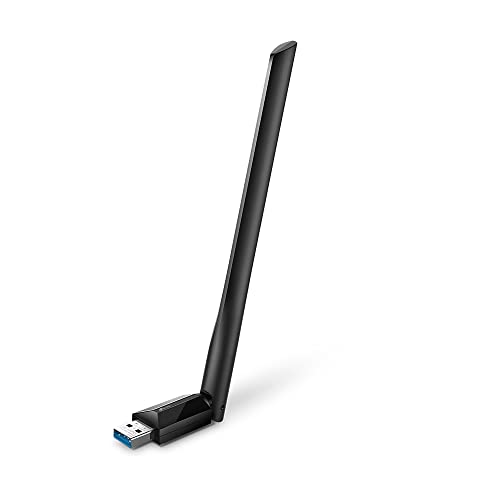
TP-Link USB WiFi Adapter for Desktop PC, AC1300Mbps USB 3.0 WiFi Dual Band Network Adapter with 2.4GHz/5GHz High Gain Antenna(Archer T3U Plus), MU-MIMO, Windows 11/10/8.1/8/7/XP, Mac OS 10.9-10.15
Brand
TP-Link
Series
Archer T3U Plus
Item model number
Archer T3U Plus
Operating System
Mac 10.9-10.15, Windows11/10/8/7/XP
Item Weight
0.6 ounces
Product Dimensions
2.28 x 0.71 x 6.83 inches
Item Dimensions LxWxH
2.28 x 0.71 x 6.83 inches
Color
Black
Power Source
Corded Electric
Manufacturer
TP-Link
ASIN
B08D72GSMS
Country of Origin
Vietnam
Date First Available
August 26, 2020
Test video – TP-Link USB WiFi Adapter for Desktop PC, :
Product highlights :
USB Computer Network WiFi adapter for PC w/ Lightning-Fast Speed: AC1300 dual-band WiFi to ensure your device runs at full speed (867 Mbps on the 5 GHz band or 400 Mbps on the 2.4 GHz band)
MU-MIMO Technology: Improves the throughput and efficiency of the whole network with MU-MIMO technology.
Dual-Band Wireless: The 2.4 GHz and 5 GHz bands provide flexible connectivity, giving your devices access to the latest dual-band WiFi router for faster speed and extended range.
5 dBi High-Gain Antennas: Advanced external high-gain antennas greatly enhance the reception and transmission signal strength of the USB adapter.
Supports the Latest Operating Systems: This WiFi adapter for PC is fully compatible with Windows 11/10/8.1/8/7/XP and macOS 10.9-10.15
Questions & Answers – TP-Link USB WiFi Adapter for Desktop PC, :
➕ What is the price of TP-Link USB WiFi Adapter for Desktop PC, in Saudi Arabia ?
The price of TP-Link USB WiFi Adapter for Desktop PC, in-store is 70 SAR VAT.
➕ When TP-Link USB WiFi Adapter for Desktop PC, was released ?
The release date was August 26, 2020.
➕ What is the price of TP-Link USB WiFi Adapter for Desktop PC, cheap used ?
The price of TP-Link USB WiFi Adapter for Desktop PC, used is 50 SAR VAT.
➕ What are the main characteristics of TP-Link USB WiFi Adapter for Desktop PC, ?
Special specifications :
USB Computer Network WiFi adapter for PC w/ Lightning-Fast Speed: AC1300 dual-band WiFi to ensure your device runs at full speed (867 Mbps on the 5 GHz band or 400 Mbps on the 2.4 GHz band)
➕ Is it interesting to buy this product ?
The best people who can answer you are customers who have already bought and tested this product (See Customer Reviews). This product is rated 4.5 / 5 on Amazon.
➕ Where to buy TP-Link USB WiFi Adapter for Desktop PC, in Saudi Arabia ?
Technical specifications – TP-Link USB WiFi Adapter for Desktop PC, :
Brand
TP-Link
Hardware Interface
USB
Operating System
Mac 10.9-10.15, Windows11/10/8/7/XP
Color
Black
Compatible Devices
Desktop
Item Dimensions LxWxH
2.28 x 0.71 x 6.83 inches
Data Link Protocol
USB
Data Transfer Rate
867 Megabits Per Second
Item Weight
0.6 Ounces
Purchase advice :
Warranty :
Check the duration of the warranty and also the faults and defects it covers. Is it complete or limited? and What is included in the warranty (parts, repairs or both)?
Shipping :
Is delivery offered? And how long does it take to get delivered (Delivery time)
Proof of purchase :
Does the shop give you an invoice ?
After-sales service :
Do they have an after-sales service to have information about the installation or operation (instructions for use). Also in case of problem, it is the seller who takes charge or you must contact the manufacturer or supplier yourself.
_____________________________
https://www.youtube.com/watch?v=aJ0oAx31W9g
16 reviews for TP-Link USB WiFi Adapter for Desktop PC,
Rated 4 out of 5
P. K (verified owner)–
shocker – When testing on your palm, the Shock strength is horrible and non existent fully charged. Waste of money worst collar ever purchased.
Rated 4 out of 5
P. K (verified owner)–
shocker – When testing on your palm, the Shock strength is horrible and non existent fully charged. Waste of money worst collar ever purchased.
Rated 5 out of 5
B. G (verified owner)–
Be sure to download the driver!!! – My existing USB dongle to my garage computer just didn’t have the speed and throughput that the rest of the house sees… so I bought this on a whim…
Rated 5 out of 5
E. S (verified owner)–
Works on my desktop so I can CAST to my Roku stick on TV – Works better than a EUDP dongle on Casting to my Roku stick on my TV. The EUDP one I had would lag. Only con is Drivers on CD and some may have to go to website to get drivers if you don’t have a CD player.
Rated 4 out of 5
M. N (verified owner)–
How I got 802.11ac and 5G working in Windows 11 – I’ve increased from 3 stars to 4 as a result of the following workaround. Can’t give 5 stars because the workaround was necessary, and because it took many hours to find!
Rated 5 out of 5
R. F (verified owner)–
slow internet or disconnects are GONE! – Weve done everything possible to get my wifes computer to stop disconnecting, including the Spectrum folks come out and “fix” it. her computer became so slow that she couldnt use it anymore. So, I figured the wifi needed a stronger antenna, like a radiio needs sometimes.
Rated 4 out of 5
I. O (verified owner)–
Works in Linux after you add the driver. – Works in linux after you add the driver.
Rated 5 out of 5
R. F (verified owner)–
slow internet or disconnects are GONE! – Weve done everything possible to get my wifes computer to stop disconnecting, including the Spectrum folks come out and “fix” it. her computer became so slow that she couldnt use it anymore. So, I figured the wifi needed a stronger antenna, like a radiio needs sometimes.
Rated 4 out of 5
A. T (verified owner)–
Works just fine in Windows but will stop working in Linux – This comes with a CD to install the necessary drivers, but it is only compatible with Windows. This isn’t much of a problem for most, but I had a computer I could no longer use for Windows, and I was hoping I could keep using it with the Linux distro Ubuntu. I found some instructions online that allowed me to install drivers for this device, and it worked for a while. But it stopped working at the next kernel update, and I am reluctant to do the same inconvenient process to get it working again. Even if I can get it working again, because I had wanted to rely on this computer as one I could access remotely, if its wireless adapter stops working every once in a while, that’s just not gonna work for me.
Rated 4 out of 5
I. O (verified owner)–
Works in Linux after you add the driver. – Works in linux after you add the driver.
Rated 5 out of 5
B. G (verified owner)–
Be sure to download the driver!!! – My existing USB dongle to my garage computer just didn’t have the speed and throughput that the rest of the house sees… so I bought this on a whim…
Rated 4 out of 5
P. L (verified owner)–
First one only functioned for a few minutes. Second one, with alternate driver, is great! – The first one they sent me functioned only briefly before quitting. It requires a USB 3 port and compatible extension cable, which I provided. When I plug in my old 802.11 N adapter, I’m back in business. Amazon is currently sending me a replacement. I will review that unit once I get it.
Rated 5 out of 5
E. S (verified owner)–
Works on my desktop so I can CAST to my Roku stick on TV – Works better than a EUDP dongle on Casting to my Roku stick on my TV. The EUDP one I had would lag. Only con is Drivers on CD and some may have to go to website to get drivers if you don’t have a CD player.
Rated 4 out of 5
P. L (verified owner)–
First one only functioned for a few minutes. Second one, with alternate driver, is great! – The first one they sent me functioned only briefly before quitting. It requires a USB 3 port and compatible extension cable, which I provided. When I plug in my old 802.11 N adapter, I’m back in business. Amazon is currently sending me a replacement. I will review that unit once I get it.
Rated 4 out of 5
A. T (verified owner)–
Works just fine in Windows but will stop working in Linux – This comes with a CD to install the necessary drivers, but it is only compatible with Windows. This isn’t much of a problem for most, but I had a computer I could no longer use for Windows, and I was hoping I could keep using it with the Linux distro Ubuntu. I found some instructions online that allowed me to install drivers for this device, and it worked for a while. But it stopped working at the next kernel update, and I am reluctant to do the same inconvenient process to get it working again. Even if I can get it working again, because I had wanted to rely on this computer as one I could access remotely, if its wireless adapter stops working every once in a while, that’s just not gonna work for me.
Rated 4 out of 5
M. N (verified owner)–
How I got 802.11ac and 5G working in Windows 11 – I’ve increased from 3 stars to 4 as a result of the following workaround. Can’t give 5 stars because the workaround was necessary, and because it took many hours to find!

P. K (verified owner) –
shocker – When testing on your palm, the Shock strength is horrible and non existent fully charged. Waste of money worst collar ever purchased.
P. K (verified owner) –
shocker – When testing on your palm, the Shock strength is horrible and non existent fully charged. Waste of money worst collar ever purchased.
B. G (verified owner) –
Be sure to download the driver!!! – My existing USB dongle to my garage computer just didn’t have the speed and throughput that the rest of the house sees… so I bought this on a whim…
E. S (verified owner) –
Works on my desktop so I can CAST to my Roku stick on TV – Works better than a EUDP dongle on Casting to my Roku stick on my TV. The EUDP one I had would lag. Only con is Drivers on CD and some may have to go to website to get drivers if you don’t have a CD player.
M. N (verified owner) –
How I got 802.11ac and 5G working in Windows 11 – I’ve increased from 3 stars to 4 as a result of the following workaround. Can’t give 5 stars because the workaround was necessary, and because it took many hours to find!
R. F (verified owner) –
slow internet or disconnects are GONE! – Weve done everything possible to get my wifes computer to stop disconnecting, including the Spectrum folks come out and “fix” it. her computer became so slow that she couldnt use it anymore. So, I figured the wifi needed a stronger antenna, like a radiio needs sometimes.
I. O (verified owner) –
Works in Linux after you add the driver. – Works in linux after you add the driver.
R. F (verified owner) –
slow internet or disconnects are GONE! – Weve done everything possible to get my wifes computer to stop disconnecting, including the Spectrum folks come out and “fix” it. her computer became so slow that she couldnt use it anymore. So, I figured the wifi needed a stronger antenna, like a radiio needs sometimes.
A. T (verified owner) –
Works just fine in Windows but will stop working in Linux – This comes with a CD to install the necessary drivers, but it is only compatible with Windows. This isn’t much of a problem for most, but I had a computer I could no longer use for Windows, and I was hoping I could keep using it with the Linux distro Ubuntu. I found some instructions online that allowed me to install drivers for this device, and it worked for a while. But it stopped working at the next kernel update, and I am reluctant to do the same inconvenient process to get it working again. Even if I can get it working again, because I had wanted to rely on this computer as one I could access remotely, if its wireless adapter stops working every once in a while, that’s just not gonna work for me.
I. O (verified owner) –
Works in Linux after you add the driver. – Works in linux after you add the driver.
B. G (verified owner) –
Be sure to download the driver!!! – My existing USB dongle to my garage computer just didn’t have the speed and throughput that the rest of the house sees… so I bought this on a whim…
P. L (verified owner) –
First one only functioned for a few minutes. Second one, with alternate driver, is great! – The first one they sent me functioned only briefly before quitting. It requires a USB 3 port and compatible extension cable, which I provided. When I plug in my old 802.11 N adapter, I’m back in business. Amazon is currently sending me a replacement. I will review that unit once I get it.
E. S (verified owner) –
Works on my desktop so I can CAST to my Roku stick on TV – Works better than a EUDP dongle on Casting to my Roku stick on my TV. The EUDP one I had would lag. Only con is Drivers on CD and some may have to go to website to get drivers if you don’t have a CD player.
P. L (verified owner) –
First one only functioned for a few minutes. Second one, with alternate driver, is great! – The first one they sent me functioned only briefly before quitting. It requires a USB 3 port and compatible extension cable, which I provided. When I plug in my old 802.11 N adapter, I’m back in business. Amazon is currently sending me a replacement. I will review that unit once I get it.
A. T (verified owner) –
Works just fine in Windows but will stop working in Linux – This comes with a CD to install the necessary drivers, but it is only compatible with Windows. This isn’t much of a problem for most, but I had a computer I could no longer use for Windows, and I was hoping I could keep using it with the Linux distro Ubuntu. I found some instructions online that allowed me to install drivers for this device, and it worked for a while. But it stopped working at the next kernel update, and I am reluctant to do the same inconvenient process to get it working again. Even if I can get it working again, because I had wanted to rely on this computer as one I could access remotely, if its wireless adapter stops working every once in a while, that’s just not gonna work for me.
M. N (verified owner) –
How I got 802.11ac and 5G working in Windows 11 – I’ve increased from 3 stars to 4 as a result of the following workaround. Can’t give 5 stars because the workaround was necessary, and because it took many hours to find!