
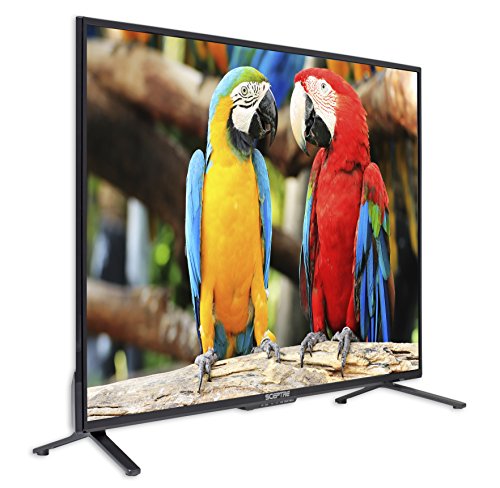
Description
Sceptre Komodo 43-Inch 4K 3840×2160 UHD LED – Features & Prices in Saudi Arabia :
Sceptre Komodo 43-Inch 4K 3840×2160 UHD LED TV 4X HDMI 2.0 HDCP 2.2, Metal Black
Product Dimensions
38 x 8 x 23 inches
Item Weight
15 pounds
ASIN
B078SCKP5Q
Is Discontinued By Manufacturer
No
Date First Available
January 3, 2018
Manufacturer
Sceptre
Country of Origin
China
Test video – Sceptre Komodo 43-Inch 4K 3840×2160 UHD LED :
Product highlights :
Questions & Answers – Sceptre Komodo 43-Inch 4K 3840×2160 UHD LED :
Technical specifications – Sceptre Komodo 43-Inch 4K 3840×2160 UHD LED :
Screen Size
43 Inches
Brand
Sceptre
Supported Internet Services
Komodo TV
Resolution
4K
Special Feature
Flat
Connectivity Technology
USB
Color
Metal Black
Product Dimensions
8″D x 38″W x 23″H
Mounting Type
Wall Mount
Year
2018
Purchase advice :
-
Warranty :
Check the duration of the warranty and also the faults and defects it covers. Is it complete or limited? and What is included in the warranty (parts, repairs or both)?
-
Shipping :
Is delivery offered? And how long does it take to get delivered (Delivery time)
-
Proof of purchase :
Does the shop give you an invoice ?
-
After-sales service :
Do they have an after-sales service to have information about the installation or operation (instructions for use). Also in case of problem, it is the seller who takes charge or you must contact the manufacturer or supplier yourself.
_____________________________
T. N (verified owner) –
Very complete and high specs, even if you’re not a gamer – Update 8/25: If you’re just getting this as a cheap HD TV set, it does all that, but because of all the capabilities you’ll need to be prepared to spend half an hour plus going through the myriad setup options, preferably with a(nother) tablet or laptop so you can look up what all that c**p means. And make sure you use, if you connect this to a PC or notebook, a newer HDMI cable, one that supports at least HDMI 1.4 and high (120 Hz) frequencies. Especially if you use a PC or laptop with Display Port (DP) output, you’ll need a converter that can handle the latest DP, HDMI and HDCP, and those aren’t $10-cheap. Neither of mine did, so I had to order the latest, which is why I have not completed testing. Ignore the folks who say it does-not-do-this or that, hit the manufacturer’s website, the specs are all there, and the email addresses for the technical support folks, they even provide free setup support for six months (I think) after purchase. When I realized my high end HP Elitebook, withh oodles of everything, didn’t support HDMI 2.0 due to its DisplayPort implementation, and its Intel GPU was designed for speed, not gaming, I ended up getting a
K. M (verified owner) –
Programmers Delight. – My 27” acer just wasn’t cutting it anymore so I bought this to be my new primary coding monitor. I got it on sale for $170. So far it’s been outstanding.
C. F (verified owner) –
You will need to manually adjust video and sound settings – All the preset video and sound equalizer settings are just awful. After trying each of the video presets I ended up just manually adjusting back light, brightness etc until I got a good picture. Sound presets are even worse, I spent about 10min checking and adjusting each frequency until I was able to at least get bareable sound at a volume of 30 or less. No amount of adjustment will have good sound above that.
A. Z (verified owner) –
Really Nice TV worth more than price – Replaced a 32 inch Fire TV in my bedroom (not a fan of smart TV’s – Fire TV’s are worse). This it a non-smart TV with a cheap Roku hooked up and works great. Nice big TV for my bedroom with a great picture!! Hope it lasts!!
K. G (verified owner) –
Terrible sound! – My previous Spectre TV was great, beside the fact that it died last week after less than 2 years from purchase! I decided to purchase another one lured by the low price, and expecting some small improvements since the last model. Well, it arrived yesterday. THE GOOD: the price, super light, great display, the leg stands are now metal instead of plastic, the connections in the back are better locate than the previous model. THE SUPER BAD: the sound!!! I can’t stand it, it sound like the speakers are inside coca-cola cans. I played with the sound settings (very minimal) and with the equilizer, and it still sounds very “tinny”. I would return it if it wasn’t such a hassle…I guess I’ll hope my ears get used to it, but when the time comes, I wouldn’t choose this brand again…
K. G (verified owner) –
A wonderful HDMI monitor for my Mac computer – I’ve been needing a replacement monitor for my Mac computer. I’ve used a TV as a monitor in the past, but, the quality of the screen was quite poor. I was hoping to find a reasonably priced one that provided a 4K screen and a 3850×2150 resolution. I found this one and decided to give it a shot. It’s a bit smaller than my previous monitor, but, the quality is amazing. Having some vision issues, a higher resolution has become much more important and critical for me. This 43″ Sceptre 4K TV with 3 HDMI ports is just what I needed. I’m very happy with this as it exceeds my expectations. If you are looking for a reasonably priced 4K non-smart TV for your computer, this one would be difficult to beat!! Enjoy!
K. G (verified owner) –
Terrible sound! – My previous Spectre TV was great, beside the fact that it died last week after less than 2 years from purchase! I decided to purchase another one lured by the low price, and expecting some small improvements since the last model. Well, it arrived yesterday. THE GOOD: the price, super light, great display, the leg stands are now metal instead of plastic, the connections in the back are better locate than the previous model. THE SUPER BAD: the sound!!! I can’t stand it, it sound like the speakers are inside coca-cola cans. I played with the sound settings (very minimal) and with the equilizer, and it still sounds very “tinny”. I would return it if it wasn’t such a hassle…I guess I’ll hope my ears get used to it, but when the time comes, I wouldn’t choose this brand again…
C. F (verified owner) –
You will need to manually adjust video and sound settings – All the preset video and sound equalizer settings are just awful. After trying each of the video presets I ended up just manually adjusting back light, brightness etc until I got a good picture. Sound presets are even worse, I spent about 10min checking and adjusting each frequency until I was able to at least get bareable sound at a volume of 30 or less. No amount of adjustment will have good sound above that.
K. G (verified owner) –
A wonderful HDMI monitor for my Mac computer – I’ve been needing a replacement monitor for my Mac computer. I’ve used a TV as a monitor in the past, but, the quality of the screen was quite poor. I was hoping to find a reasonably priced one that provided a 4K screen and a 3850×2150 resolution. I found this one and decided to give it a shot. It’s a bit smaller than my previous monitor, but, the quality is amazing. Having some vision issues, a higher resolution has become much more important and critical for me. This 43″ Sceptre 4K TV with 3 HDMI ports is just what I needed. I’m very happy with this as it exceeds my expectations. If you are looking for a reasonably priced 4K non-smart TV for your computer, this one would be difficult to beat!! Enjoy!
T. N (verified owner) –
Very complete and high specs, even if you’re not a gamer – Update 8/25: If you’re just getting this as a cheap HD TV set, it does all that, but because of all the capabilities you’ll need to be prepared to spend half an hour plus going through the myriad setup options, preferably with a(nother) tablet or laptop so you can look up what all that c**p means. And make sure you use, if you connect this to a PC or notebook, a newer HDMI cable, one that supports at least HDMI 1.4 and high (120 Hz) frequencies. Especially if you use a PC or laptop with Display Port (DP) output, you’ll need a converter that can handle the latest DP, HDMI and HDCP, and those aren’t $10-cheap. Neither of mine did, so I had to order the latest, which is why I have not completed testing. Ignore the folks who say it does-not-do-this or that, hit the manufacturer’s website, the specs are all there, and the email addresses for the technical support folks, they even provide free setup support for six months (I think) after purchase. When I realized my high end HP Elitebook, withh oodles of everything, didn’t support HDMI 2.0 due to its DisplayPort implementation, and its Intel GPU was designed for speed, not gaming, I ended up getting a
A. Z (verified owner) –
Really Nice TV worth more than price – Replaced a 32 inch Fire TV in my bedroom (not a fan of smart TV’s – Fire TV’s are worse). This it a non-smart TV with a cheap Roku hooked up and works great. Nice big TV for my bedroom with a great picture!! Hope it lasts!!
K. M (verified owner) –
Programmers Delight. – My 27” acer just wasn’t cutting it anymore so I bought this to be my new primary coding monitor. I got it on sale for $170. So far it’s been outstanding.